How to Collect Video Testimonials From Your Clients
Last year I tried asking clients for testimonials. It felt like begging for compliments. Most ignored me. A few sent one-line replies like "Great service!" which convinced nobody. Then I changed the ask, and the format, and the replies started coming back as video.
Why video testimonials work better
Video testimonials show a real person saying what changed. That is a different signal from a five star rating, because the buyer can hear hesitation, tone, and specifics. When someone says on camera that a process now takes twenty minutes instead of two hours, the number is doing the work, not the adjective.
Here is how to collect them without making anyone uncomfortable, including you.
The ask script that gets replies
I used to send a plain email. Now I record a short video request, and the request itself has four parts: context, result, request, and effort.
- Context. "Hi Sarah, we finished the checkout rebuild last month."
- Result. "The one where the failed payments dropped off."
- Request. "Would you be up for recording 60 seconds on how that went?"
- Effort. "One click, it opens your camera, there is no signup, and you can retake it as many times as you like."
That last line decides it. When the ask looks like work, people say they will do it later, and later never comes. Naming the effort removes the excuse before they can reach for it.
Make it easy to respond
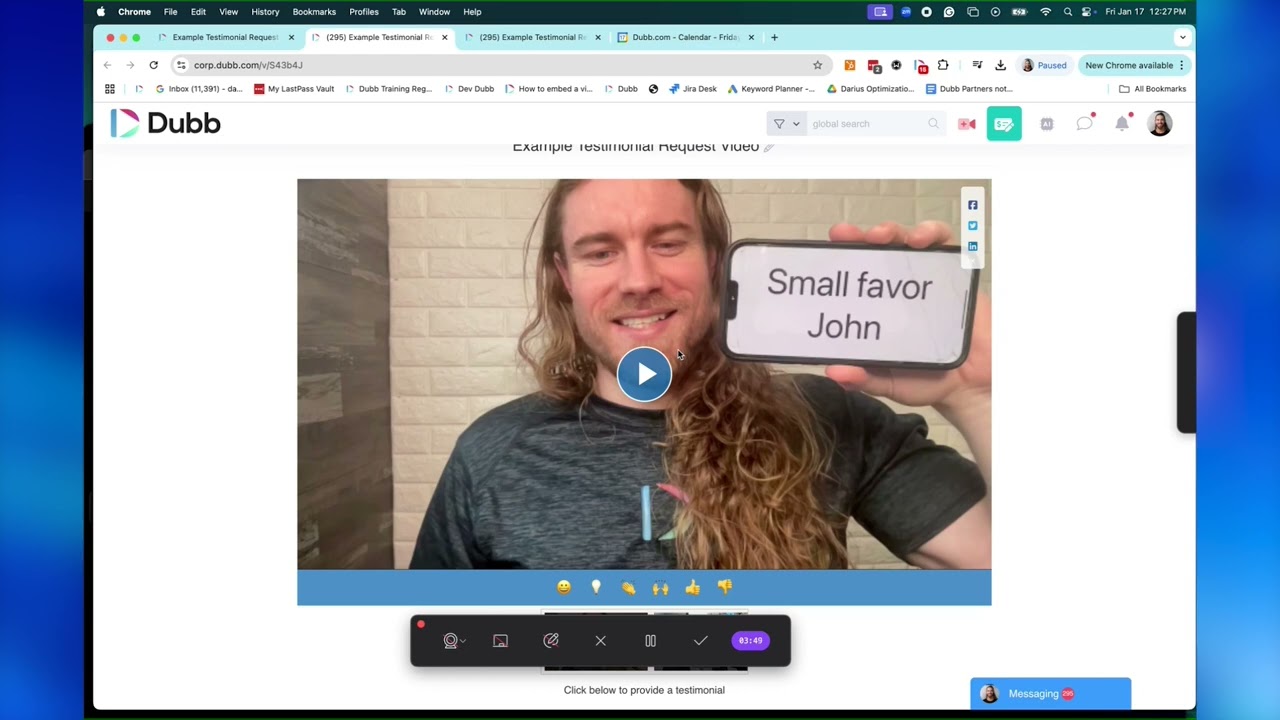
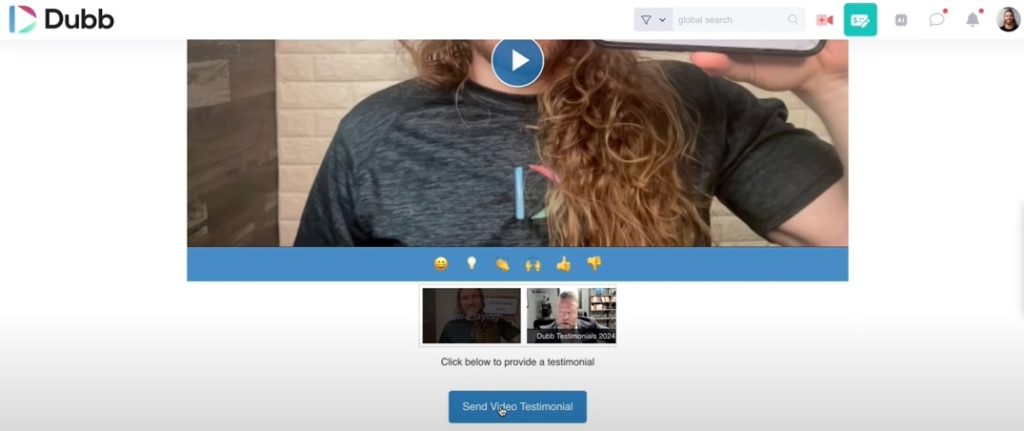
Nobody wants to download an app or create an account to do you a favor. In Dubb I put one button under the video request: send a video testimonial. It opens their camera in the browser, they record, they hit send, and it lands in my library.
A second button goes to the review page, for the people who would rather write than record. Give both options and you stop losing the ones who only want to do it the easy way.
Show two or three examples in the request. People match the length and tone of what they see, so the samples do more than any instruction.
The four things a usable testimonial must contain
A testimonial fails for a boring reason: it is missing one of four pieces of information. Fix the four and the same client, saying the same thing, becomes usable everywhere.
| Piece | What it looks like | Why it matters |
|---|---|---|
| A named person | Full name, role, company | Anonymous praise reads as invented, even when it is not. |
| The before state | What they were doing before, and what it cost them | This is the part buyers recognise themselves in. |
| The change, with a number they will stand behind | A figure the client is comfortable being quoted on | A vague result gets discounted. A specific one gets remembered. |
| Permission and credit | Written yes, plus how they want to be named and linked | Without this you cannot publish, and a late ask for permission kills momentum. |
Ask for all four in the first request. Chasing them one at a time later is how a testimonial ends up sitting in a folder for a year.
Eight questions that get a specific quote
The single biggest upgrade to a testimonial is the question you ask. "Would you say something nice about us?" produces a compliment. These questions produce a case.
- What were you doing before, and what was not working? This sets the baseline a buyer compares against.
- What made you look for something different when you did? Timing explains why a decision happened, not just what was chosen.
- What changed in the first month? Early change is the easiest thing for a client to remember accurately.
- What number can you point at? Replies, booked calls, hours saved, close rate. Whatever they already track, not something you invented for them.
- What surprised you? This is where the useful, unpolished detail lives, and it sounds nothing like marketing copy.
- Who would you tell to use this, and who should not? A qualified recommendation converts better than an unqualified one, and it filters out bad-fit leads.
- What almost stopped you? This is the objection script you have been trying to write from the outside.
- What would you say to someone in your position who is still deciding? The closing line of the video, handed to you by the person who already bought.
Send these as prompts, not a script. A client reading a script sounds like a client reading a script, and viewers can hear it.
How I set up the request in Dubb
A testimonial request in Dubb is a call to action set to video reply. I create the call to action, choose video reply as the type, and name the button after the outcome instead of leaving the default wording. Then I record a short video that says what I am asking for and where the answer goes.
One detail that decides whether this works: the description above the button only shows when it is the only call to action on the page. Stack three buttons and the instruction disappears. So the request page does one job. The customer clicks, records from their phone or webcam, and the video lands in my account already attached to their contact record.
If you are new to that part of the product, how to use call to actions on Dubb walks through the settings.
Asking on a call versus asking on video
Most requests fail because of where they happen, not what they say. There are three places to ask, and each has a job.
On the call, at the moment of the win
Ask out loud in the same conversation where they tell you it worked. Say the ask plainly, then send the recording link before the call ends. The request lands while the result is still fresh, and they cannot forget it in an inbox. If they hesitate, offer to send three prompts they can read from, which removes the fear of going blank on camera.
On video, when you cannot be live
Record a thirty second ask in your own face and voice, and send that instead of a paragraph. A typed request for a video is easy to skip. A person asking for one is harder to ignore, and it demonstrates the exact format you are asking them to use.
The same applies to the reminder. A second typed nudge reads as chasing. A short video nudge, sent a few days later, reads as a person following up.
In writing, for the details only
Written requests are best for the logistics: where to record, how long it takes, the prompts, and the permission line. Keep the persuasion out of writing and keep the details in it.
Text beats email
My reply rate went up when I stopped putting the request in an inbox. A text gets read while someone is waiting for coffee, and the link opens a camera, not a form. If you want the mechanics of that channel, including message length and opt in rules, see how to text videos for SMS marketing.
Automated follow ups
Most of the testimonials I have came from the follow up, not the first ask. The sequence is short:
- Tag the clients who have a result worth talking about.
- Send the video request with the one click button.
- Two days later, a short reminder that repeats the link.
- One final nudge, then stop and leave them alone.
It still reads as personal because the request uses their name and references the work you actually did together.
Where testimonials go to shine
Every reply lands in one library, and from there it has three jobs:
- Short clips for LinkedIn and your own feed.
- Full videos on the pricing page and the proposal.
- A link in your email signature, so it travels with every message.
Storing testimonials so you can find them again
The most common waste is a testimonial you already own and cannot find. Ten minutes of naming discipline fixes it, and it turns a folder of clips into something you can pull from on demand.
| Field | Example | Why |
|---|---|---|
| File name | jane-doe-acme-saas-2026-03.mp4 | Sortable, searchable, clear who and when without opening it |
| Client name and company | Jane Doe, Acme | Matching against your CRM |
| Result claimed | Booked calls up from 4 to 11 a month | Lets you find a testimonial that fits the page you are building |
| Industry and use case | SaaS, outbound sales | Industry proof converts harder than generic proof |
| Permission status | Written yes, 12 March 2026, named and linked | You can publish without a second conversation |
| Where it is used | Homepage, pricing page, proposal template | Stops the same face appearing three times, or nowhere |
Tag by the claim, not by the client name. When you need proof for a page about booking more calls, you will search by the claim.
What if they do not reply?
Most people do not ignore you on purpose. They read the message on their phone, mean to record something, and forget. I send one short nudge after three days and one after a week, then I leave it. The nudge is one line: still happy to use whatever you send, no script needed. If someone has said yes twice and gone quiet, I move them to a list I ask again next quarter instead of chasing them now.
Get permission before you publish
Ask two questions before they record, not after. Can I use this on my site and in proposals? And would you rather I show your name and company, or keep it anonymous? A written yes in the same email thread is enough for most cases, and it saves you from taking a video down later. If a client wants to approve the final cut, send them the finished page and wait. A testimonial you had to remove is worse than one you never published.
The four places a testimonial belongs
One video sitting on a hidden page does nothing. I use every testimonial in four places, because the same clip works harder each time it appears.
- On the page where the decision happens, next to the price or the booking button.
- In the proposal or quote you send, right where the objection usually lands.
- In the follow up, usually the third or fourth message, once the prospect has gone quiet.
- Where your buyer already spends time. LinkedIn for B2B, Instagram for local services, YouTube for anything people search.
That is what turns a nice clip into a sales asset. I went deeper on the placement side in how to leverage video testimonials to grow your business.
Measure whether the testimonials are working
A testimonial is a conversion asset, so measure it like one. Four things are worth tracking, and all of them are already visible if the video lives on a Dubb video page.
- Views on the testimonial page. If nobody opens it, the placement is wrong, not the testimonial.
- How much of the video gets watched. A drop at eight seconds tells you the opening line is weak. A drop at forty seconds tells you the video is too long.
- Whether they clicked the call to action on the page. A watch with no click is a warm visitor who left without a next step.
- Replies to the email or message it was sent in. That reply is the closest thing to a conversion you will see before a deal closes.
Compare one placement at a time. Moving a testimonial onto the pricing page and the homepage in the same week tells you nothing about which one earned the click. One change, two weeks, then the next.
Testimonial tools compared
You do not need a specialist platform to start. You need two things: a way for a customer to record from their phone without downloading anything, and a place for the finished video to live.
Forms collect written answers. They are free and familiar, and they give you nothing on camera. Asking people to record on their phone and text you the file works, and it is what I did for the first year, but you end up chasing files and re-uploading them by hand.
A video ask tool gives the customer a link, they record in the browser, and the video lands in your account. Dubb does that and also gives every testimonial its own page with a call to action and view tracking, which is the part that makes it usable inside a sales process. If you want the reasoning, the one truth of creating and sharing video testimonials covers where most people get it wrong.
My advice: start with the tool you already pay for, and only add software when the manual step is the thing stopping you from asking.
Best practices worth repeating
- Ask within a week of a win, while the feeling is fresh.
- Give them three questions instead of a blank screen.
- Tell them sixty seconds is plenty.
- Send one reminder, not five.
- Reply with the finished page so they see it live. That thank you is what earns the next referral.
- Keep the raw file. You will want a shorter cut later.
Three mistakes I made
- Asking too late. Ask right after the win, when the relief is still fresh.
- Being vague. "Tell people you like us" gets silence. Name the result you want them to talk about.
- Hiding the results. A testimonial nobody sees is a compliment, not an asset.
Frequently asked questions
How do you ask a client for a video testimonial?
Ask right after the win, name the specific result, and make recording take one click. A request that arrives three months later reads like an afterthought, and one that needs an app install rarely happens.
How long should a video testimonial be?
Thirty to sixty seconds is enough. One clear result, said plainly, is more convincing than a long monologue, and it is easier to reuse in email, on a landing page, or in a proposal.
What should the client actually say?
Give them three prompts instead of a script: what it was like before, what changed, and who it is for. Prompts keep it natural and stop people from reading off a page.
Should you send them examples?
Yes. Two or three short samples set the length and the tone, and people tend to match what they see.
Where should video testimonials be used?
Put them where the decision gets made: the pricing page, the proposal, the follow up email, and the video page you already send to prospects.
Can you use a testimonial without a video?
Yes, and you should. A written quote next to a name and a photo still works. Video is the upgrade, not the entry requirement, and a client who will not record will often send a line you can publish the same day.
How many testimonials do you need?
Enough to cover the objections you actually hear. Three or four that each answer a different hesitation beat twenty that all say the same thing.
Where should a video testimonial link point?
Point it at the next step you want the viewer to take, not at a library of other testimonials. On a Dubb video page that is the call to action on the page, so a viewer who finishes watching has one obvious place to go.
Final thought
The change was not the tool. It was making the ask specific and the recording effortless. Two clicks from a client is worth more than a paragraph of praise, and it keeps working long after you have moved on to the next deal.
For a longer conversation on proof and how it compounds, there is this RevShow episode on social proof.
Start a free Dubb trial and send your first testimonial request today. No credit card needed.
Ask once, collect the testimonial
Send a page with one question and a record button. The customer records from their phone, and you get the clip without a calendar call.