Turn a Document Into a Sales Video
If you’ve ever struggled to turn written content into engaging videos, you’re not alone. Video content consistently outperforms text in terms of engagement, retention, and conversion rates. But what if you could transform text into high-quality videos effortlessly?Introducing the text to video converter.
Why Use Text to Video Converter for Sales and Marketing?
You already have the words. A proposal, a deck, a blog post or a support answer can become a video without writing a new script. Paste the text, pick a voice and a look, and you have something you can send the same day. That is the shortest route from a document to a reply.
Text-based content is essential, but it lacks the impact of video. With a video, you can add tone, emphasis, and personality that text alone cannot convey. Here are a few key benefits:
- Increased Engagement: Videos capture attention faster than text.
- Better Retention: People remember visual and auditory information better than written words.
- Higher Conversion Rates: Video messages feel more personal, making them more persuasive.
- Time Efficiency: Instead of writing lengthy emails, send a quick video message.
How Dubb Simplifies Text to Video Conversion
Dubb offers a direct way to convert text into video, eliminating the need for professional video production. With features like AI-powered voiceovers, customizable video pages, and automation tools, Dubb makes it easy to create impactful videos from simple text inputs.
Key Features:
- AI Voice Narration: Convert written scripts into natural-sounding voiceovers.
- Custom Branding: Add logos, colors, and CTAs to match your brand identity.
- Automation & Integrations: Distribute videos through email, SMS, CRM, and social media.
- Personalized Video Pages: Send videos with custom landing pages for better engagement.
Step-by-Step Guide to Creating Text to Video on Dubb
Step 1: Log into Your Dubb Account
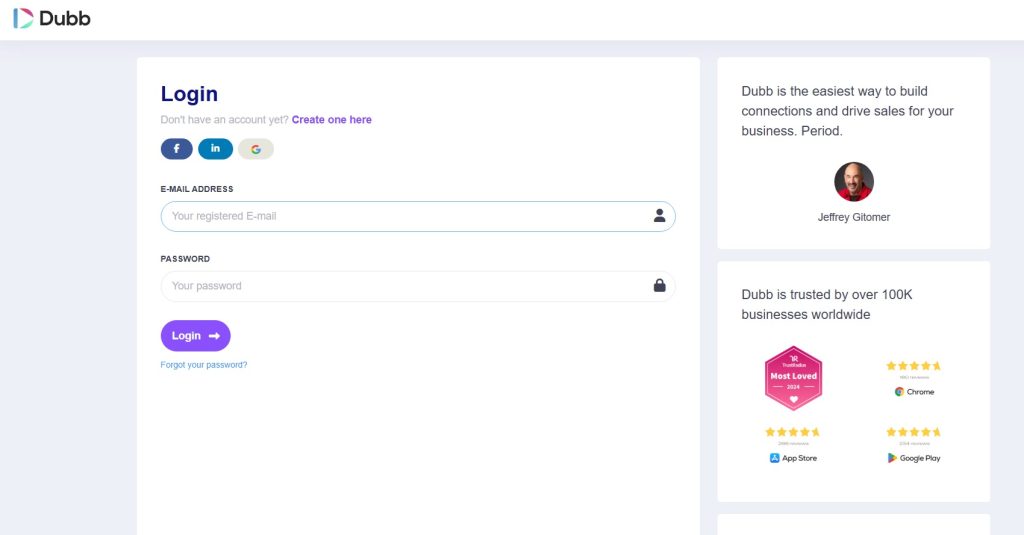
If you don’t have an account yet, sign up for a free trial at Dubb.
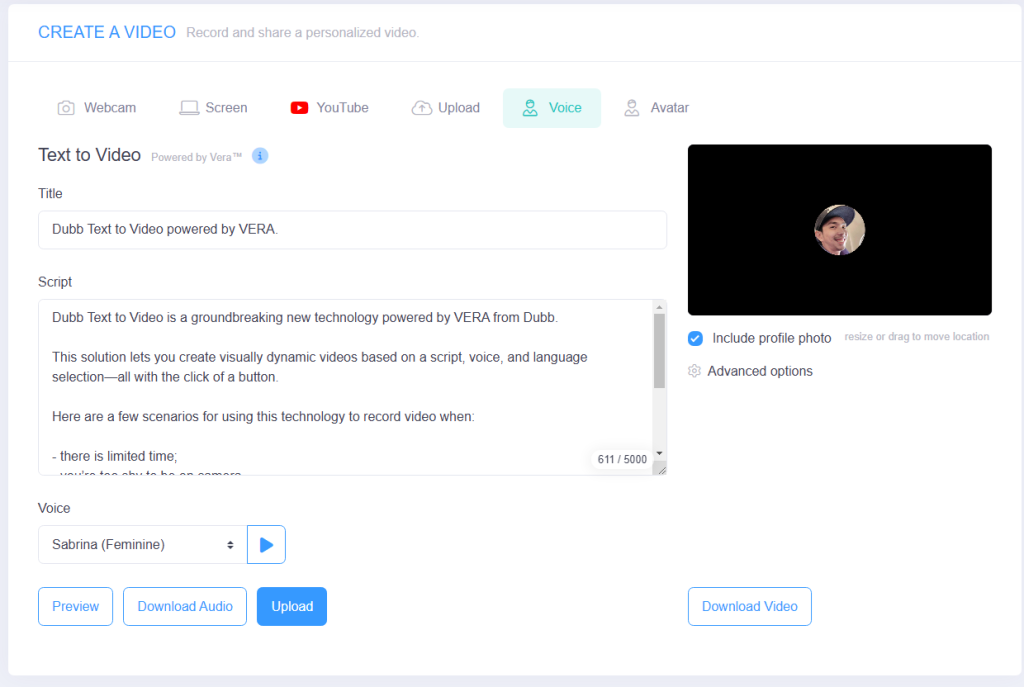
Step 2: Choose the Text to Video Feature
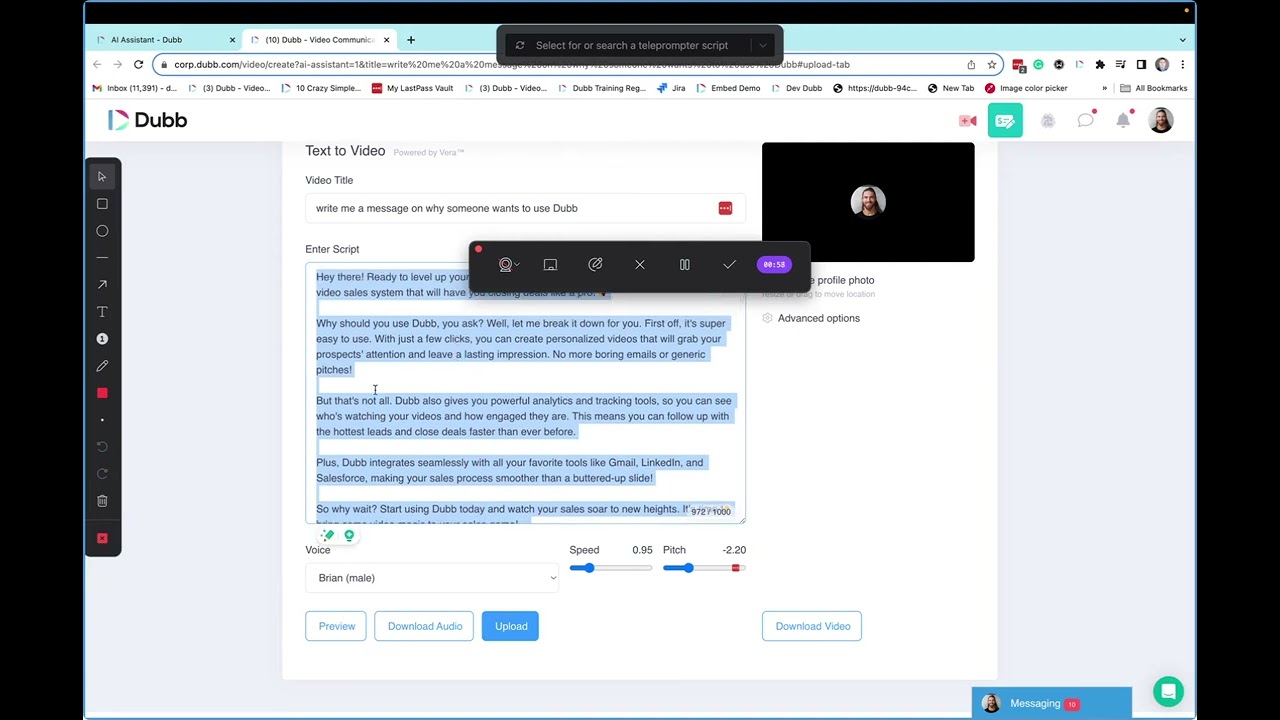
Navigate to the Dubb dashboard and select the text to video option.
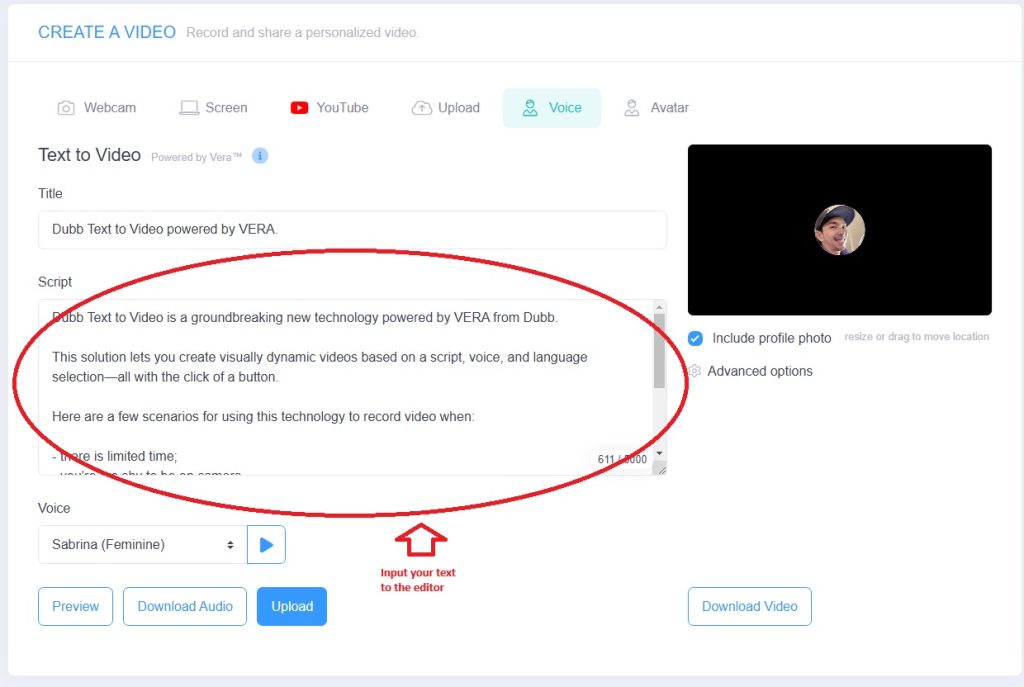
Step 3: Enter Your Script
Type or paste your text into the editor. Keep it concise and engaging.
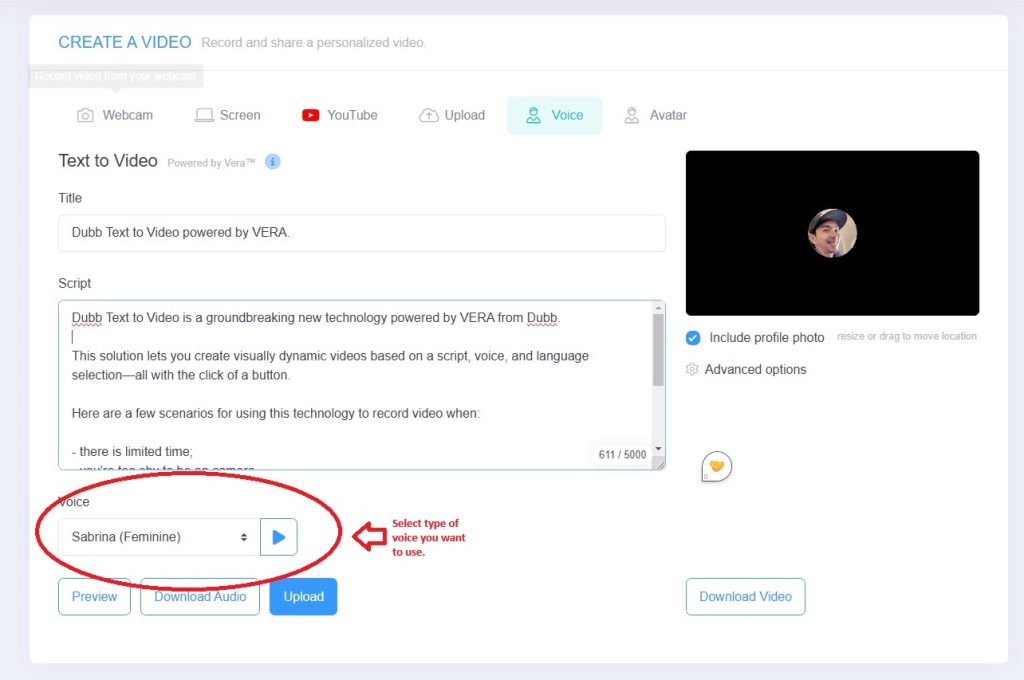
Step 4: Select a Voice and Style
Dubb provides AI-generated voiceovers in various tones and accents. Choose one that fits your brand.
Step 5: Customize Your Video
Enhance your video with visuals, brand elements, and call-to-action buttons.
Step 6: Publish and Share
Once your video is ready, distribute it through email, SMS, LinkedIn, or embed it on your website.
Which documents convert well, and which do not
Some documents are already a script with a layout. A proposal, a process document, a support answer, a one page brief. Those convert well because the thinking is done and the only missing piece is a voice.
Others resist conversion. A contract, a spreadsheet, a specification with tables, anything where the meaning lives in the structure rather than the sentences. Those need editing before they need narrating, and pasting them straight in produces a clip that reads like someone reciting a form.
The test is simple. Read the document aloud. If it sounds like something you would say to a person, convert it. If it sounds like something you would send, it needs a pass first.
The best candidates are the documents you send repeatedly with a short covering note. The note is usually the script, and the document is the thing the viewer needs afterwards, which makes the pair work far better than either alone.
Turning a document into a script without rewriting it
The edit is mostly subtraction, and it follows a predictable order.
Cut the cover. The title, the date, the client name and the prepared by line are all page furniture. A spoken clip does not need any of it, and saying it costs five seconds of the viewer's attention for no information.
Keep the headings that carry the argument and drop the ones that organise the page. A heading like scope of work becomes a spoken transition, and a heading like section two becomes nothing at all.
Turn lists into sentences. A bulleted list spoken aloud loses the structure it depends on, so say the items in order with words that mark the order: first, then, and finally.
Move the numbers into context. A price on a page sits next to a description. In a clip it needs a sentence around it, or the listener has no way to know whether the figure is good news.
Then read the result aloud once. If it takes less than forty seconds and covers the point, it is ready. If it takes two minutes, the document is being recited rather than explained.
Where the video should sit: page or email
A document video in an email competes with the document. A document video on a page complements it, because the page can hold the clip, the written version and the next step in one place.
The email should carry a light preview and one link. The link goes to the page, the page plays the clip, and the document sits underneath for the reader who wants the detail. That structure keeps the message small, keeps it out of the promotions tab, and gives you a view count rather than a guess.
If the document has to travel as an attachment, send the clip as a link inside the same message rather than as a second attachment. Two attachments in one email is a message that looks like a mail merge.
For internal use, the page model still applies. A training document, a process change or an onboarding checklist with a two minute explanation above it gets watched and understood in a way the document alone does not, and the page can be linked from the wiki that everyone already uses.
Where the page itself sits, and how to embed it, is covered in video on your website.
The document still has a job
The video is the explanation and the document is the reference. Confusing the two is why some teams stop making videos and some stop updating documents.
A person who watched a two minute walkthrough will still want to check a clause, a number or a date three weeks later. That is the document's job, and it does it better than video ever will because it can be searched and skimmed.
So keep both current, and make the video point at the document rather than replace it. A sentence at the end that says the full breakdown is on the page underneath is enough, and it tells the viewer there is a place to look.
Then keep the pair together in the library. A folder with a clip and no document, or a document with a clip that describes a previous version, produces the worst outcome available: a confident explanation of something that has changed.
Narrating a deck is not the same as explaining one
A narrated deck reads the slides. An explanation uses the slides as evidence while the voice does the thinking, and the difference is the reason one gets watched to the end and the other gets closed.
Record the explanation first, without slides, as though you were talking a client through it on a call. Then place the slides under the parts where a picture helps. That order produces a clip with an argument. The other order produces a slide show with commentary.
It also fixes pacing. Slides tempt you into spending equal time on each one, and a deck almost never deserves equal time. Some slides need four seconds, and one needs forty.
If a slide needs to be read rather than shown, it is a document page. Move it to the leave behind and say the one sentence that matters out loud. Viewers forgive a clip that skips detail. They do not forgive a clip that reads to them.
Measuring whether the document video was opened
A document sent as an attachment gives you nothing. A document video on a page gives you four numbers, and each one answers a different question.
Opens tell you whether the subject line worked. Watch depth tells you whether the explanation held. A drop in the first ten seconds is a framing problem, and a drop at two minutes is a length problem. The call to action tells you whether the next step was obvious, and replies tell you whether any of it mattered.
Read them together rather than one at a time. High opens with shallow watch is a promise the clip did not keep. Low opens with deep watch is a delivery problem rather than a content one, and no amount of re-editing fixes it.
Then follow up on the watch data rather than the calendar. A prospect who watched most of a document walkthrough is further along than one who replied with a one word acknowledgement, and the next message should reflect that. editing a long recording covers what to do with the short version of the same recording.
Writing for the ear when the document is formal
Most business documents are written in a register nobody speaks in. The sentences are longer, the nouns are abstract, and the verbs hide inside them. That register survives the page and dies in the ear.
Convert in this order. Find the verb hiding in the noun and bring it back: instead of provide an explanation, say explain. Break any sentence with more than one comma into two. Replace and/or constructions with a decision. Delete any sentence that begins with in order to.
Then check the pronouns. A formal document avoids you because it is written for a record. A spoken explanation is addressed to a person, so the second person belongs in almost every other sentence.
Swearing, slang and jokes do not belong in either version unless you already write that way. The register changes when you convert a document. The personality does not.
Converting a week of documents in one sitting
The conversion is fast enough to batch, and batching is what makes it a habit rather than a project.
Pick one hour a week. Gather the four or five documents you sent in the previous week that produced questions, and convert each into a ninety second explanation. That set is a better guide than any content calendar, because it is drawn from what people actually asked.
Work in a fixed order for each one: cut the page furniture, pull the two sentences that carry the argument, move the numbers into context, read it aloud, paste, generate, listen once, publish. Ten to fifteen minutes per document once you have done it twice.
Publish them as a set rather than one at a time, so the library has a shape, and link them from the documents they came from. A document with a link to its own explanation stops generating the same question, which is the point of the exercise.
Keep the outputs together in one place with the date they were made. Six months later the conversion takes the same fifteen minutes, and the only thing that slows it down is wondering which explanation you have already recorded and which one is still a paragraph in a document.
The internal version nobody makes time for
The same conversion works on the documents that never leave the building, and the return is easier to see because the audience is captive.
Onboarding checklists, process changes, a new tool with a login screen, a handover note. Each one arrives as a document that a new person has to interpret, and the interpretation is where the time goes. A two minute explanation above the document removes most of it.
Record these yourself rather than generating them when the content is about your own process, because the questions people ask afterwards are about the exceptions and a voice they recognise makes them easier to ask. Generate the ones that are pure reference: how to submit an expense, where the files live, what the schedule is.
Keep one page per process with the video at the top and the written steps underneath. A new hire who can watch, skim and start is a new hire who stops interrupting the person who wrote it.
Best Practices for Engaging Text to Video Content
- Keep It Short: 30-90 seconds is ideal for most business videos.
- Use a Conversational Tone: Write as if you’re speaking to a real person.
- Highlight Key Benefits: Focus on value rather than features.
- Include a Call-to-Action: Encourage viewers to take the next step (schedule a call, sign up, etc.).
- Test and Optimize: Track engagement metrics and refine your content accordingly.
Real-World Use Cases
- Sales Outreach: Send personalized video messages instead of plain emails.
- Marketing Campaigns: Convert blog posts and social media content into videos.
- Customer Support: Create video FAQs and tutorials to assist users.
- Internal Communication: Share company updates and training materials in video format.
Get Started with Dubb Today
With Dubb, you can create high-quality videos quickly and easily. Ready to improve your sales and marketing strategy? Try Dubb for free and start converting text into impactful videos today.
Frequently asked questions
Can I convert a PDF directly?
You can paste its text, and the result will read like a document unless you edit it first. A PDF is a layout, not a script. Take the sentences that carry the argument, drop the page furniture, and the conversion takes minutes.
Does the video replace the document?
No. The video explains and the document is the reference people return to. Keep both, and make the video point at the document rather than trying to absorb it.
What if the document is confidential?
Do not paste it into a tool you have not cleared for that data. Convert the part that can be shared, or record a walkthrough that refers to the document without quoting it, and keep the file itself inside your own systems.
How long does the conversion take?
The generation is minutes. The editing is the real cost, and it is proportional to how much the document depends on layout. A one page brief takes ten minutes. A forty page proposal should be cut to a page first.
Bring the document, record over it
Load the doc, read the walkthrough off the teleprompter, and publish it on a page that reports who watched and how far they got.
Want to maximize your sales growth? Get a Free Trial Dubb.
Join over 100K businesses who have joined Dubb.