Videos have become a powerful tool for enhancing communication in emails. They offer a dynamic way to convey messages, capture attention, and engage recipients in a manner that text alone cannot achieve. Embedding videos in Gmail, a feature that leverages the power of multimedia, is a fantastic way to make your emails more interactive and effective.
How to Embed Video in Gmail
Unfortunately, it’s technically impossible to fully embed a video inside the body of a Gmail. But don't fret! There are effective alternatives that can enhance your email communication. Let’s dive in and explore the best way to share videos in Gmail.
Embedding a video directly into the body of a Gmail is not feasible because Gmail, along with other common email providers like Outlook, does not support HTML5, which is necessary for embedding videos. This technology is typically reserved for websites and landing pages. However, this limitation doesn’t mean you can’t share videos in your emails. Let's go over some alternatives.
Alternatives to Embedding Videos in Gmail
Sending Videos as Google Drive Attachments
You've likely tried this common approach-uploading a video to Google Drive and sharing the link via Gmail. While this method works on a basic level, it's not the best solution for sales communication.
The main drawback is the lack of analytics. When sending a video through Google Drive, you can't track vital metrics like view counts, which contacts watched your video, or even the number of clicks it receives. This leaves you completely in the dark about your outreach effectiveness.
The Drawbacks of Attachments
One might think of attaching videos to emails, but this approach has several downsides:
- Attachment Limits: Gmail has a 25 MB attachment limit. Suppose the file you're sending exceeds this limit. In that case, the video automatically gets uploaded to your Google Drive account and can be watched by your contact as a Google Drive video file.
- Security Concerns: Recipients are often hesitant to download attachments from unknown sources, and for good reason. Email attachments have historically been a common vector for malware and viruses, leading many users and organizations to implement strict security policies regarding attachment downloads. This hesitation can significantly reduce the likelihood of your video being viewed.
- Deliverability Issues: Modern email systems employ sophisticated filtering algorithms that pay special attention to messages containing attachments. Emails with attachments, particularly those sent to new contacts or containing large files, are more frequently flagged by these systems and redirected to spam or promotions folders. This significantly reduces the visibility of your message and decreases the chances of your video being seen by the intended recipient.
Uploading Videos to YouTube
Another option is sending YouTube links in your email. While YouTube is an excellent platform, it has limitations for business communications.
YouTube presents additional challenges unique to its platform. When sending YouTube links, your prospects will be exposed to various distractions like advertisements, recommended videos, and comments that can draw attention away from your message.
The platform's recommended videos feature, while great for personal use, can actually harm your business goals. Viewers are likely to click away to suggested content, forgetting your message entirely. This "sidelining" creates a barrier between you and your prospects. You're essentially competing against YouTube's sophisticated algorithm, which is designed to keep viewers watching other content-making it challenging to maintain focus on your message, product, or service.
When using YouTube, you also lose crucial sales features like customizable calls-to-action. Though YouTube offers massive reach with billions of users, it wasn't designed for sales conversion. Without built-in call-to-action buttons, it's harder to guide viewers through your sales funnel and generate leads.
YouTube also limits your branding potential. Unless you invest significant time customizing your channel, your video becomes just another piece of content in the vast YouTube ecosystem. Viewers have no clear path to engage further with your business.
Most importantly, YouTube videos struggle to drive conversions. After watching your video, viewers often ask, "What's next?" On YouTube, this question goes unanswered. In contrast, specialized tools like Dubb are designed specifically for sales conversion, making it easier to guide prospects toward making a purchase.
The Best Way to Share Videos in Gmail
Let's explore exactly how to send a video through Gmail.
At Dubb, we've created a comprehensive platform for recording and sending videos via email. Our platform goes beyond basic video sharing-you can launch email campaigns, send SMS messages, create automated workflows, and generate instant video landing pages with customizable calls to action.
These video landing pages are a standout feature that sets our platform apart. When we emphasize "instant," we're not exaggerating-the moment your video finishes uploading to Dubb, a professionally designed landing page is automatically generated and ready to use.
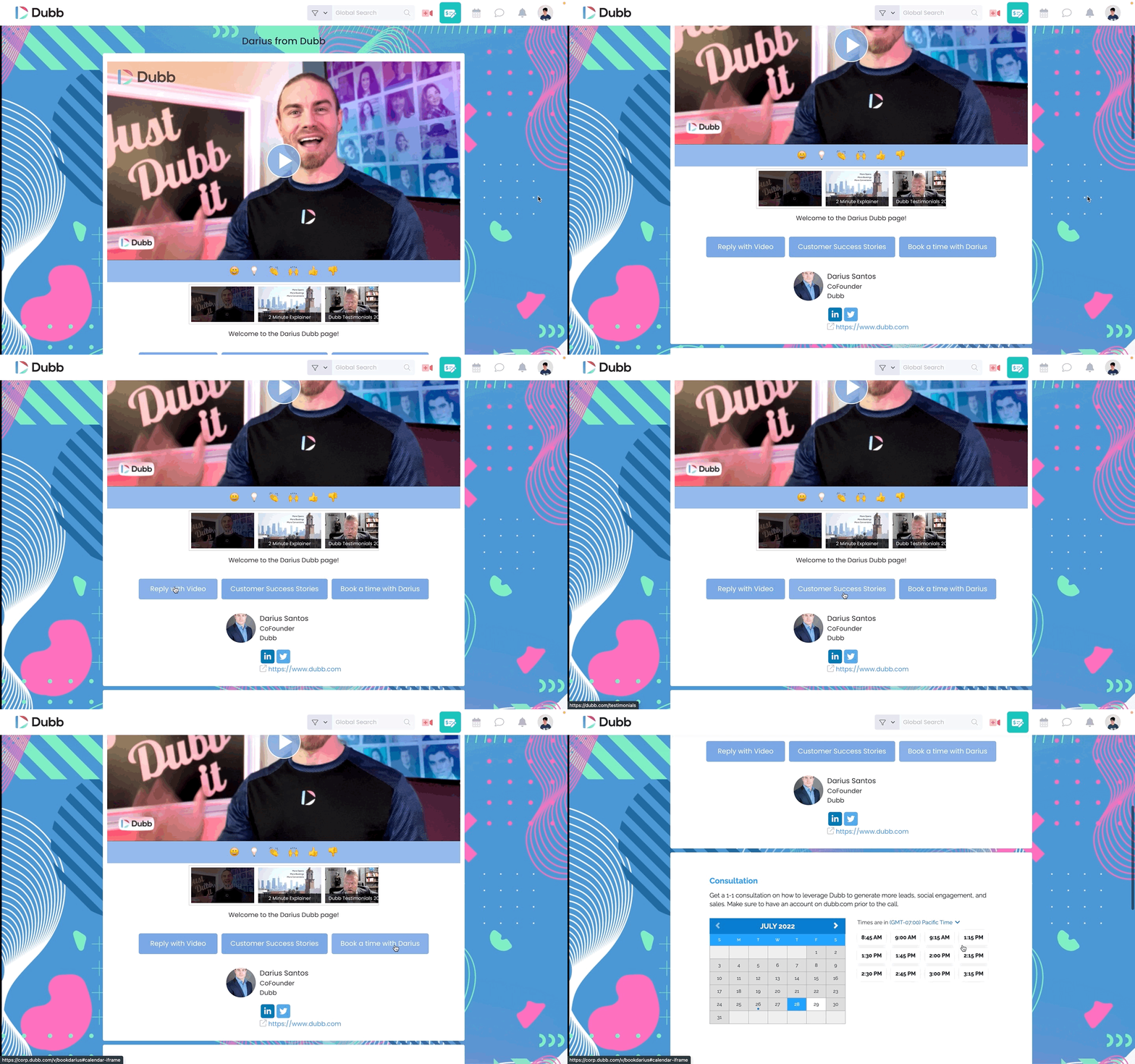
This seamless process eliminates the traditional waiting period and technical complexity often associated with creating video landing pages. The customization options are extensive and business-focused: you can enhance your page with strategically placed calls to action, integrate your calendar scheduling system for immediate appointment booking, enable visitors to chat with an AI assistant for instant answers to their inquiries, and implement various other engagement tools. The flexibility of Dubb's landing pages accommodates virtually any business need, whether you're focused on lead generation, sales conversion, customer support, or training. Whatever functionality your business requires for effective video communication, a Dubb video landing page can be configured to support your specific goals. Whatever you need, a Dubb video landing page can handle it.
Ready to get started? Here's how:
First, create a free Dubb account-just click here. Next, install the Dubb Chrome extension, which lets you create and upload video content (including screen recordings) easily. It's basically a Chrome screen recorder. Get the Chrome extension here. For desktop users, we recommend downloading the Dubb desktop app, available for both PC and Mac. And don't forget our feature-rich Dubb mobile app for Android and iOS, which lets you shoot in clips, add music, include voiceovers, and much more.
After installing the Chrome extension, log into your Dubb account. A free account works well for basic needs. For access to advanced features like presets, calls to action, campaigns, and automations, check out our paid options here.
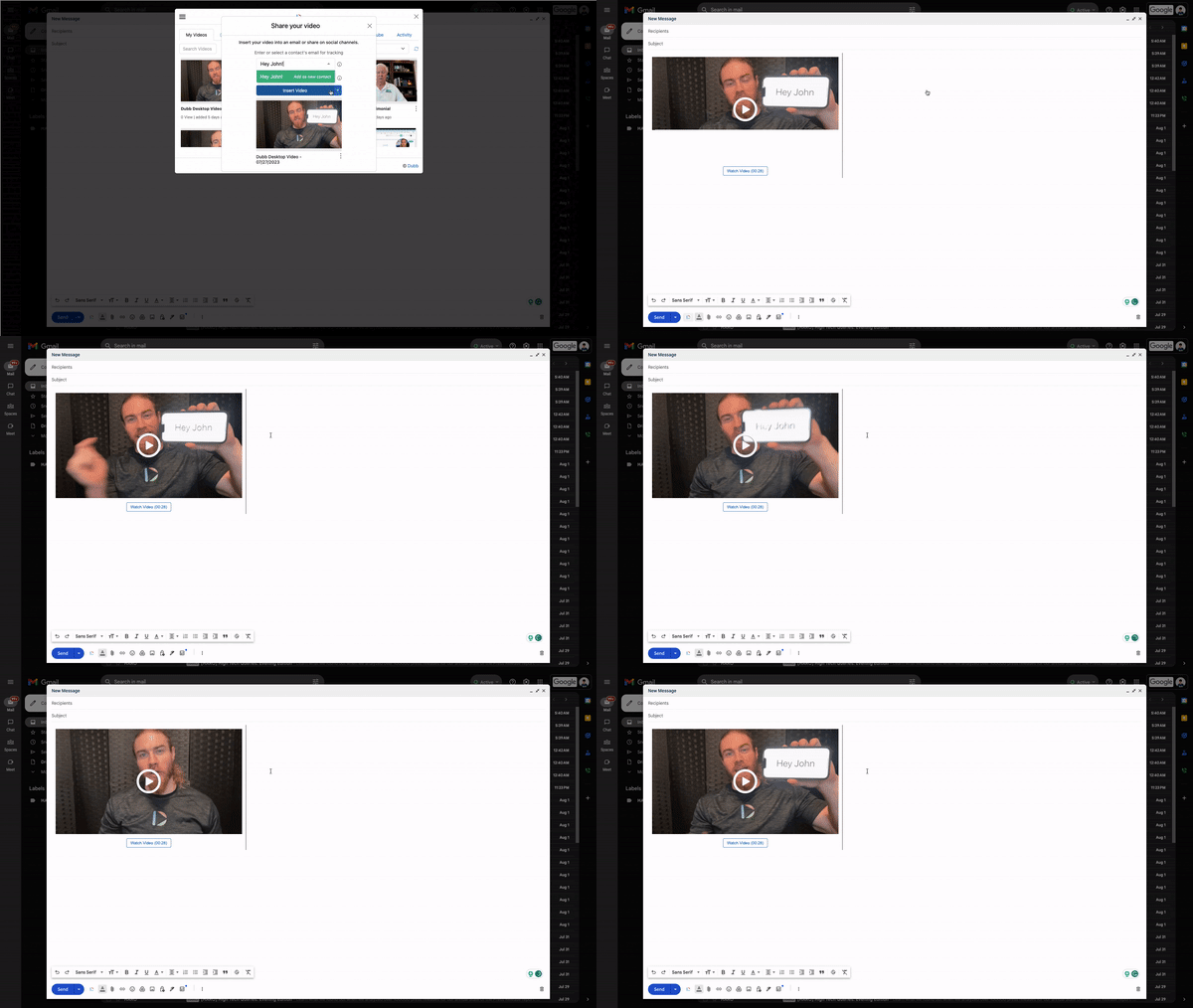
Once logged in, you'll notice a Dubb icon in your Gmail interface. Click it to access your video library. Here's the magic: selecting any video automatically inserts an animated GIF preview and trackable link into your email. Your recipient will see the first three seconds of your video, sparking curiosity and increasing the likelihood they'll watch the full content.
Haven't created your video yet? No problem. Record it on any device, focusing on delivering value to your viewer. Once you upload your video to Dubb, the platform automatically creates your video landing page and adds the preview GIF to your Gmail message.
When recipients view your landing page and watch your video, you'll get detailed real-time analytics. Track who watched your video and for how long, plus see interaction with call-to-action buttons and emoji reactions.
This tracking capability transforms your outreach strategy. Instead of cold calling, you can smart call-using video engagement data to guide your follow-up. For example, if a prospect watches several sales videos completely, they might be ready for a purchase conversation. If they consistently drop off at certain points, you may need to adjust your approach. This insight helps you build stronger relationships and close more sales effectively.
Using Dubb for Video Sharing
The most effective way to share videos in Gmail is by using Dubb. Here’s how it works:
1. Record Your Video: Use Dubb to record your video.
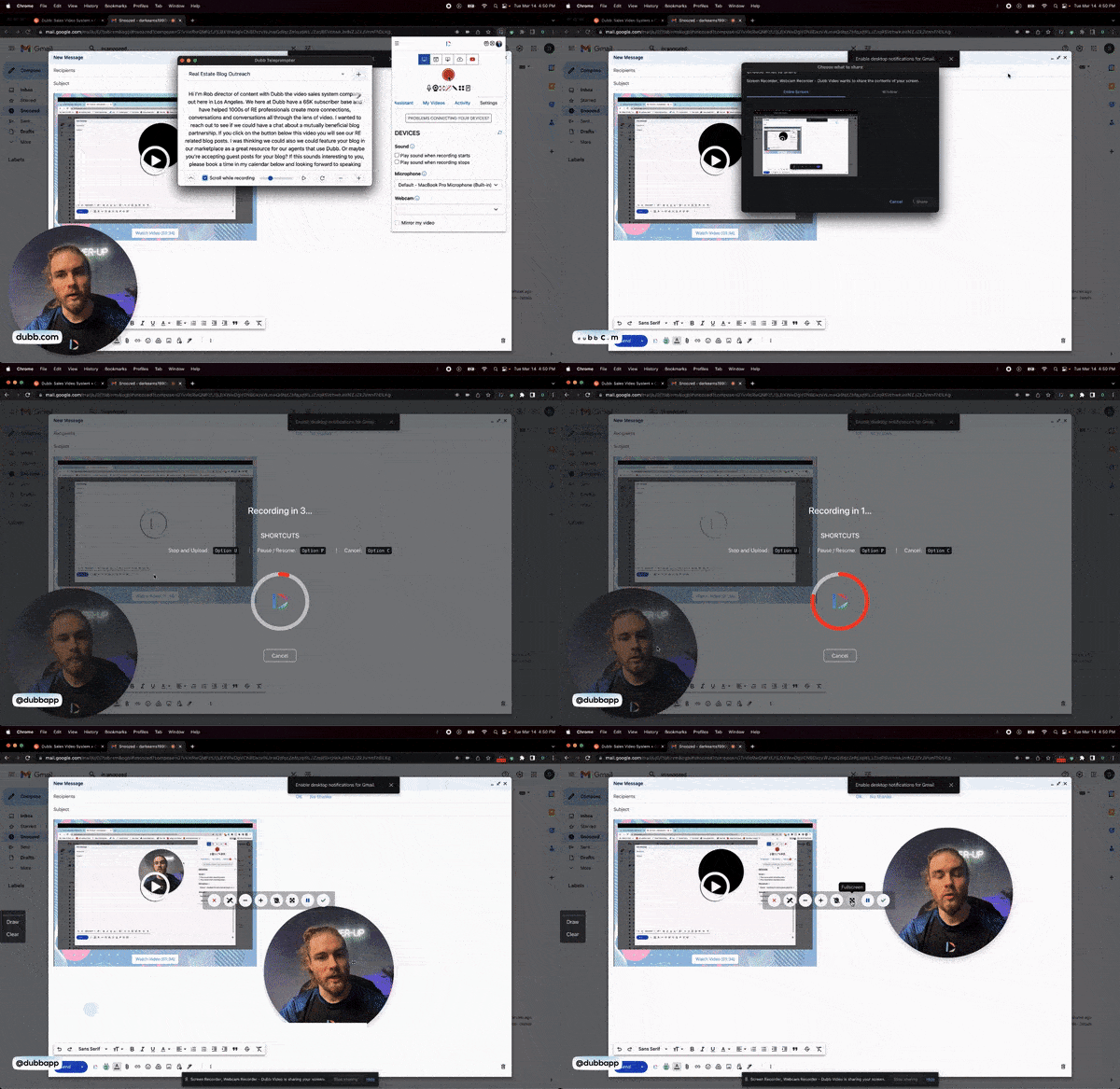
2. Upload to Dubb: Once you upload your video to your library, the system automatically generates a three-second GIF preview of your video.
3. Insert the GIF: Place this GIF into the body of your email. This looping image acts as a preview and entices recipients to click.
4. Custom Landing Page: When the recipient clicks on the GIF, they are taken to a custom landing page where they can watch the full video.
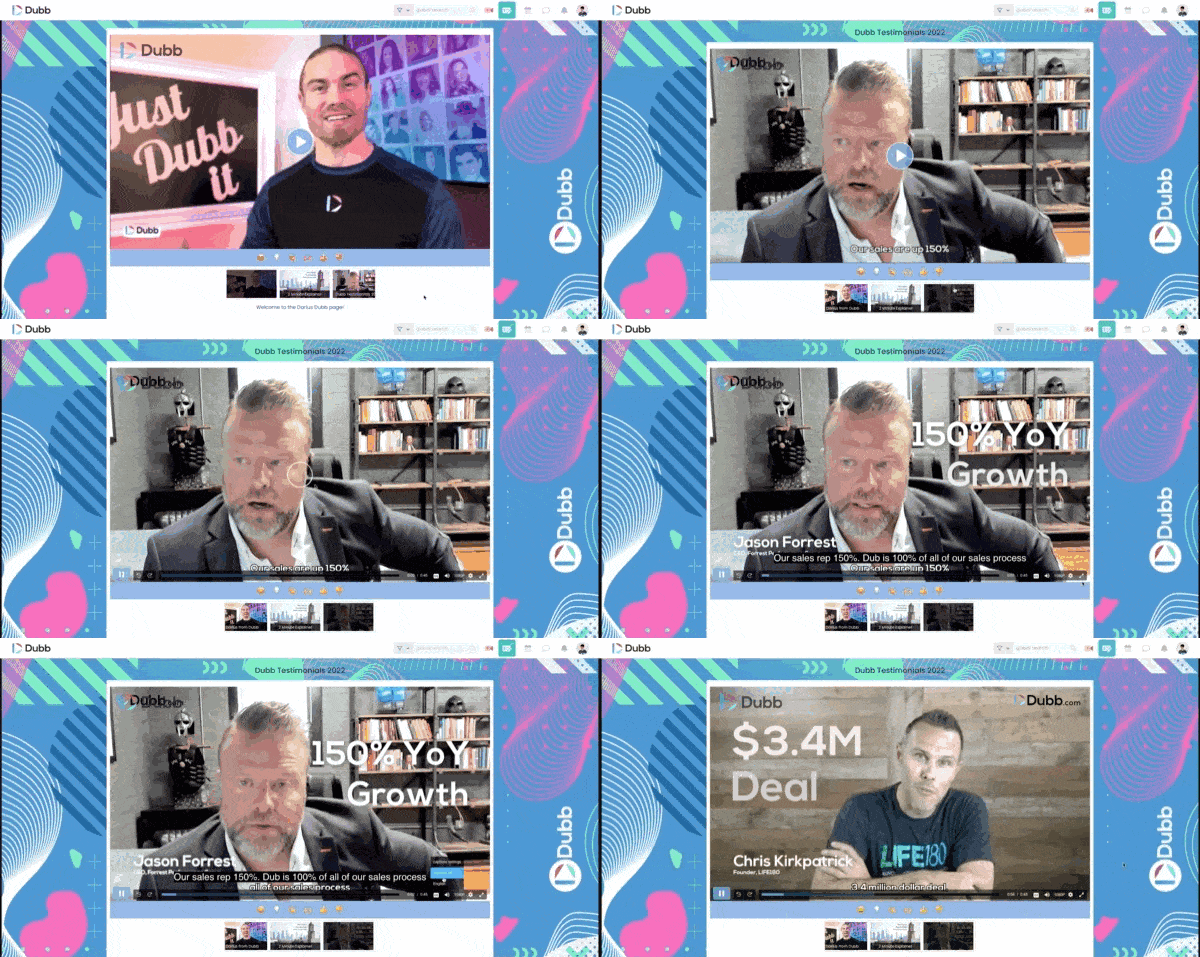
This method bypasses attachment limits and enhances deliverability, making it an excellent option for business development and marketing.
Proof: Why This Actually Works
Based on anonymized usage patterns across B2B sales teams, consultants, and business development professionals using Dubb
over a 12-month period, we observed a consistent behavioral trend:
Teams that replaced plain-text follow-ups with short video follow-ups (under 90 seconds) tended to see higher reply rates
than text-only outreach, longer engagement time on video landing pages, and increased calendar booking activity when a
scheduling call-to-action (CTA) was present.
One anonymized mid-sized sales team in professional services shifted from PDF attachments to video walkthroughs with
embedded calendar links.
What changed
- Replaced static proposals with 2-minute personalized video summaries
- Added a scheduling CTA below each video
- Used engagement tracking to prioritize follow-ups
Outcome
- More qualified conversations
- Shorter sales cycles
- Fewer unresponsive leads
We consistently see that users who include a clear CTA under their video tend to outperform users who only send video
without a next step.
Methodology note: Insights are based on aggregated and anonymized user interaction signals including watch
time, click-through behavior, and CTA interaction patterns across B2B users observed over a rolling 12-month period.
The pattern is simple: Video increases attention. Clear next steps increase action.
Frequently Asked Questions
Can I actually embed a playable video directly inside Gmail?
No. Gmail does not support HTML5 video playback inside the email body. The most effective workaround is using an animated
GIF preview that links to a hosted video landing page.
Is sending a Google Drive link good enough for sales outreach?
It works technically, but it lacks analytics, tracking, and conversion tools. You cannot see who watched or how long they
engaged, which limits your ability to follow up strategically.
Will video attachments hurt my email deliverability?
They can. Attachments increase the likelihood of spam filtering and create friction for recipients who may hesitate to
download files from unknown senders.
Why not just use YouTube for business video emails?
YouTube introduces distractions like ads and recommended videos. It also lacks built-in conversion-focused calls-to-action
tailored for sales workflows.
Does video really improve email engagement?
Yes. Visual communication builds trust faster than text alone. In practice, video increases clicks, engagement time, and
response rates when paired with a clear next step.
Streamlining Your Gmail Video Workflow for Higher Engagement
Gmail may not support embedded HTML5 video, but that doesn’t mean your outreach has to remain static.
The workflow we discussed solves three core problems: deliverability friction, engagement tracking gaps, and missing
conversion paths.
With Dubb, the process becomes straightforward: record a short, value-driven video, automatically generate a landing page,
insert an animated preview in Gmail, track engagement, and guide viewers with built-in calls-to-action.
If you’re looking to implement the Gmail video workflow we discussed, you can set up a free trial at Dubb.com and see how
these templates and landing pages work inside your own outreach process.
No complex setup. No technical friction. Just clearer communication and measurable engagement.
If you’re interested in leveraging this powerful tool, you can try Dubb for free. Visit dubb.com to start your free trial, no credit card required. Additionally, Dubb offers live training sessions every weekday at 10 a.m. Pacific to help you get the most out of their platform.
If you would like to learn more about how to send a video through Gmail or how Dubb can help you with this task, please click here. To sign up for a for a free 7-day trial of our premium plans, you can click here.
Want to maximize your sales growth? Get a Free Trial Dubb.
Join over 100K businesses who have joined Dubb.