How do you send and track video messages with Dubb?
Sending and tracking video messages with Dubb means attaching a recipient to a send, sharing the video through a supported channel, and then reviewing engagement signals such as opens, clicks, video page views, watch activity, and call-to-action clicks. The exact reporting depth depends on how the video is sent – one-to-one sends and Dubb-native tools provide the most detailed visibility, while third-party tools typically limit reporting to what those external platforms already surface.
Table of Contents
- How Dubb video tracking works
- How to send a Dubb video one-to-one
- How campaigns and automations change the workflow
- What happens when you use Gmail, LinkedIn, text, CRMs, or third-party tools
- Dubb and alternatives: which option fits which use case?
- Common mistakes and troubleshooting
- Best practices for cleaner tracking and follow-up
- Proof: why this actually works
- FAQ
- Building a simpler video sending workflow with Dubb
How Dubb video tracking works
At a practical level, Dubb tracking is built around send context. Before the video is shared, a name or email can be added for tracking. That action ties the send to a specific contact for that instance – making it possible to see who engaged and how far they moved through the experience.
The measurable actions in this workflow, in order of increasing intent, are:
Rank follow-ups by the deepest action, not the send date. Someone who clicked a CTA deserves faster attention than someone who only generated an open. That sequence is what separates passive visibility from active intent.
Here is the full workflow at a glance:
← Scroll to see full table
| Step | What happens | What you can observe |
|---|---|---|
| 1. Add recipient | Enter or select a name or email for tracking | The send is associated with a specific contact for that one-time send |
| 2. Share the video | Use the share & send flow, then copy for email or another channel | The video can be distributed via email, LinkedIn, social media, text, or other tools |
| 3. Recipient engages | The person opens, clicks, views, watches, or clicks a CTA | Those actions appear as trackable engagement signals in your dashboard |
| 4. Review engagement | Check reporting at the individual or campaign level | Identify who engaged and prioritize follow-up accordingly |
How to send a Dubb video one-to-one
The simplest use case is sending a video to one person and tracking that individual’s behavior. Follow these five steps:
-
1
Open the video and choose the sharing flow
From the video, use the Share and Send option. This is where the tracking context is created for the send.
-
2
Add a name or email for tracking
Enter the recipient’s email address or select an existing contact. If the address is new, it can be added on the spot. This connects that email to that specific send – not as a permanent pairing, but for this one-time distribution.
-
3
Copy the video for email
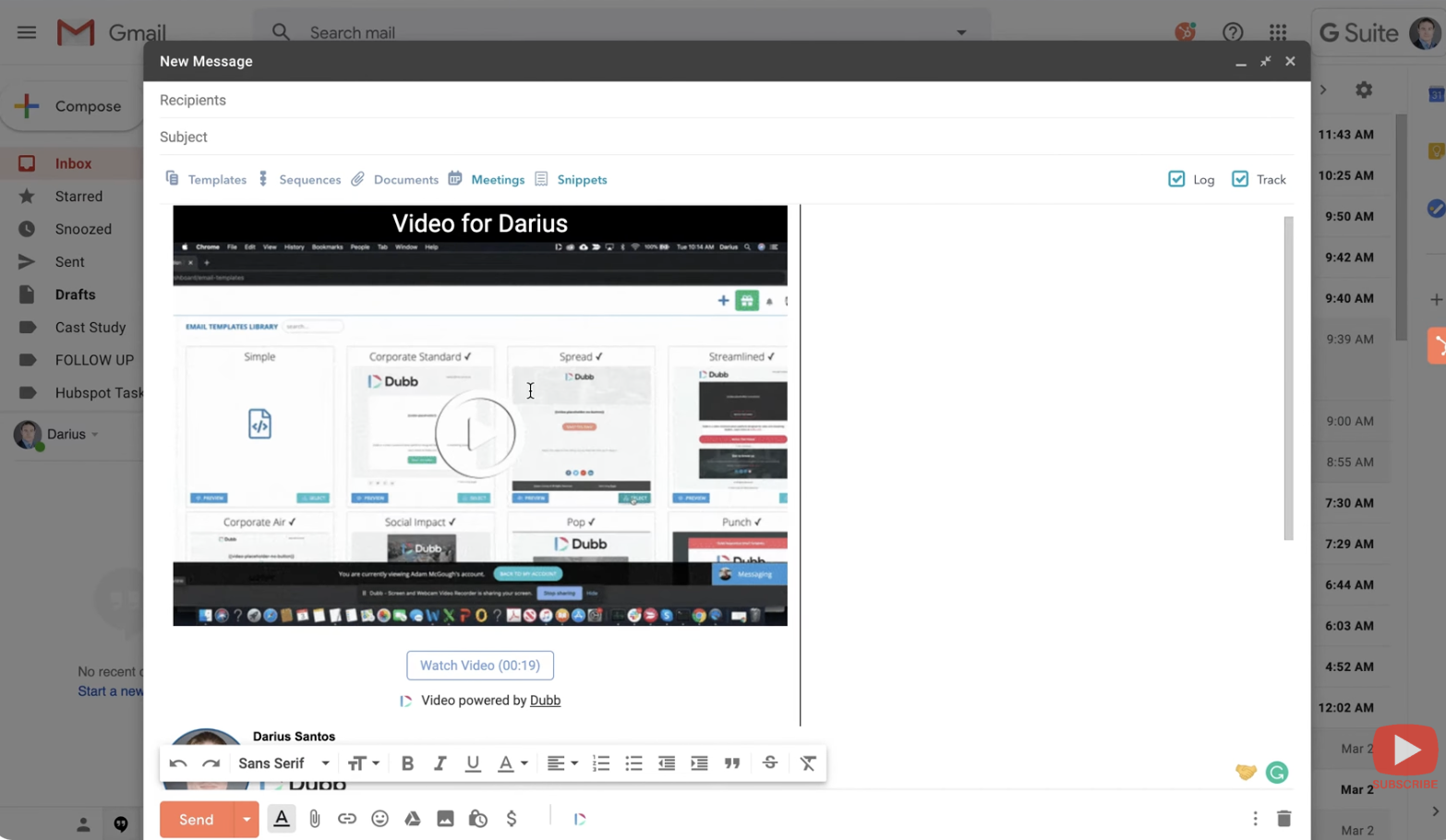
Use the Copy for Email option and paste it into the channel you’re using. In email clients this inserts a GIF-style visual with optional personalization (e.g., the recipient’s first name). Display may vary by channel – that’s expected.
-
4
Send through the channel you already use
This workflow is compatible with all of the following:
- 📧 Gmail
- 📘 Outlook
- 📬 AOL
- 📱 Social media messages
- 💬 Text / SMS
- 🗃️ CRM one-to-one sends
-
5
Review engagement from the identified recipient
Because the send was tied to a known contact beforehand, engagement data – opens, clicks, page views, watch behavior, and CTA clicks – is viewable at the individual level.
How campaigns and automations change the workflow
One-to-one sending is ideal for individual tracking. Campaigns and automations are the better fit when the same video or sequence needs to reach a larger audience.
Campaigns
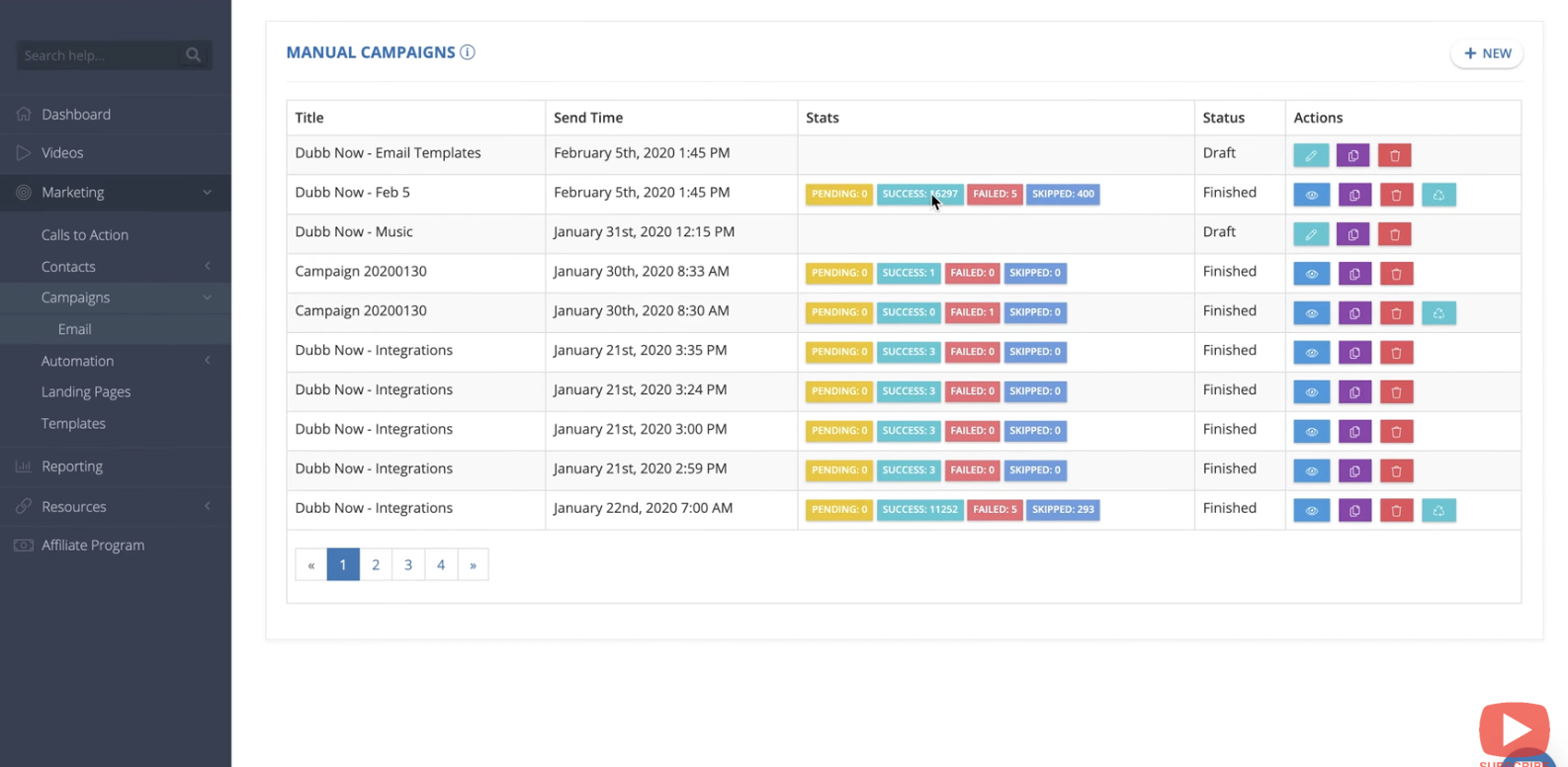
Campaigns are the bulk-send path inside Dubb. Instead of sending to one person, the video is distributed to a list at scale. The benefit is not just distribution – it’s the reporting structure that comes with it. The campaign view shows who is watching, who is clicking, who is engaging, sent status, and failed sends. Reports can be filtered and exported, making it easy to sort by name, email, or engagement level.
Automations
Automations are the sequence-based version – a series of emails with timing delays between steps, useful when the process requires structured follow-up logic rather than a single send.
What happens when you use Gmail, LinkedIn, text, CRMs, or third-party tools
The sending channel changes how the video appears – and sometimes how much you can measure.
One-to-one sends through external channels
If the sender first connects the contact in Dubb and then uses the copy-and-paste method to send through Gmail, LinkedIn, text, or a CRM, individual tracking tied to that identified person is still preserved.
Dubb-native campaigns and automations
When the send happens through Dubb’s built-in tools, reporting is deeper and easier to analyze at scale – including filtering, exports, and user-level engagement review.
Third-party campaign and automation tools
If the video is inserted into outside platforms such as Mailchimp, HubSpot Marketing Automation, or Woodpecker, the send can still happen – but those tools provide only their own opens and clicks metrics, not the detailed video-level analytics available within Dubb.
← Scroll to see full table
| Sending path | Best use case | Tracking depth |
|---|---|---|
| One-to-one with recipient attached first | Personal outreach via email, LinkedIn, text, or social | Individual-level engagement tied to the identified recipient |
| Dubb campaign | Bulk sending to a contact list | Detailed reporting, filters, exports, and per-recipient engagement at scale |
| Dubb automation | Multi-step email sequences with timed delays | Full sequence-level and recipient-level reporting inside Dubb |
| Third-party tool (Mailchimp, HubSpot, etc.) | Existing marketing stack or CRM-led distribution | Platform’s own opens and clicks only – not Dubb’s full video-detail layer |
Dubb and alternatives: which option fits which use case?
Dubb sits in a category alongside other video messaging tools including Loom, Vidyard, and BombBomb. The useful comparison isn’t “which tool wins” – it’s “which workflow needs which kind of reporting and sending control.”
← Scroll to see full table
| Tool | Good fit for | What to evaluate |
|---|---|---|
| Dubb | Teams that want one-to-one tracking, built-in campaigns, automations, direct sending, and video engagement reporting in one workflow | How often you need recipient-level tracking and whether sending + reporting in one place matters |
| Loom | Teams centered on simple video messaging for internal or external communication | How much reporting depth you need compared with straightforward recording and sharing |
| Vidyard | Sales and marketing orgs that care deeply about video engagement and broader video management | How your team uses viewing signals in outbound and content workflows |
| BombBomb | Users focused on video communication through inbox and outreach channels | How tightly your process depends on email-led engagement and related workflows |
Common mistakes and troubleshooting
Forgetting to attach the recipient before sending
This is the most important setup mistake in one-to-one outreach. If the recipient is not connected before the send, the workflow loses the clean attribution needed for person-level tracking.
Expecting third-party analytics to match Dubb-native reporting
Mailchimp, HubSpot, and similar tools can still distribute the message, but their reporting reflects what those systems track – not the same video-detail layer as Dubb-native campaigns or automations.
Assuming every channel displays the asset the same way
Email may show a GIF-style visual. LinkedIn may show a still thumbnail and link. Text and social environments may render differently again. This is normal – test before you scale.
Over-reading email opens
An open is only an early signal. In real follow-up prioritization, page views, watch behavior, and CTA clicks are far stronger indicators of intent.
Skipping channel-specific documentation before scaling
When a team wants to use a specific third-party tool, search the Dubb tutorial or support material for that channel first. It reduces avoidable formatting and configuration issues.
Best practices for cleaner tracking and follow-up
-
1
Decide the send type first
Personal, bulk, or sequence-based? That determines whether to use one-to-one sharing, campaigns, or automations – before you create anything.
-
2
Attach the contact before sending when attribution matters
That is the cleanest way to know which person engaged with your video. Don’t skip this step on any send you care about tracking.
-
3
Choose the channel based on where the recipient actually responds
A good-looking render doesn’t matter if the audience never engages there. Channel fit beats visual fidelity.
-
4
Separate distribution convenience from analytics needs
A third-party platform may fit your broader stack, but if detailed video reporting will change what a rep does next – send through the path that preserves the most detail.
Proof: why this actually works
What makes this workflow operationally useful is that it separates weak interest from stronger intent. An open tells a sender the message surfaced. A link click or video page view shows a higher level of curiosity. A watch indicates actual consumption. A CTA click is the clearest next-step signal in the sequence.
In practice, that matters because follow-up quality improves when teams stop treating every send the same way. A recipient who watched the video and clicked the CTA deserves different – and faster – attention than one who only opened the email.
FAQ
How do I send a Dubb video through Gmail and still track it?
Can I track a Dubb video sent through LinkedIn or a text message?
What happens if I send a Dubb video through Mailchimp or HubSpot?
What is the difference between Dubb campaigns and Dubb automations?
Can I send a Dubb video directly from inside Dubb?
Building a simpler video sending workflow with Dubb
The core decision in this workflow is straightforward: use one-to-one sends when attribution to a single person matters, use campaigns when the message goes to a large list, and use automations when follow-up timing needs structure. Dubb supports each of those paths, while also making copy-and-paste distribution work across email, LinkedIn, social, text, and external tools.
The most useful habit to build is choosing the sending path before creating the outreach motion. That keeps reporting cleaner and follow-up faster. Start with a single tracked send, test how it renders in your channel, and use the Dubb tutorial section for channel-specific setup before rolling it out at scale.
Ready to send your first tracked video?
Start with one send, see who engaged, and follow up with context. That’s the whole workflow.