How do you write a real estate newsletter that keeps you top of mind?
A real estate newsletter works best when it helps recipients learn something useful about the local market, not when it repeats a listing feed they can already browse. A practical approach is to choose a locally relevant topic, deliver a quick market update, and keep the copy short so the main action is clear. A video-led update can improve open rates and recall by combining face, voice, and timely context in one asset-so the message feels informative, not promotional-something best real estate teams can run consistently.
What is a real estate newsletter?
A real estate newsletter is a client communication email sent on a recurring schedule to maintain awareness and credibility with people who may purchase or sell later (or send a referral). Its purpose is to stay top of mind by providing relevant local insight rather than duplicating MLS-style inventory feeds.
In the workflow covered here, Dubb is used to convert a market report into a short script (via Otto), record with a built-in teleprompter, then send your newsletters with a video at the top.
Why listing-heavy sends get ignored
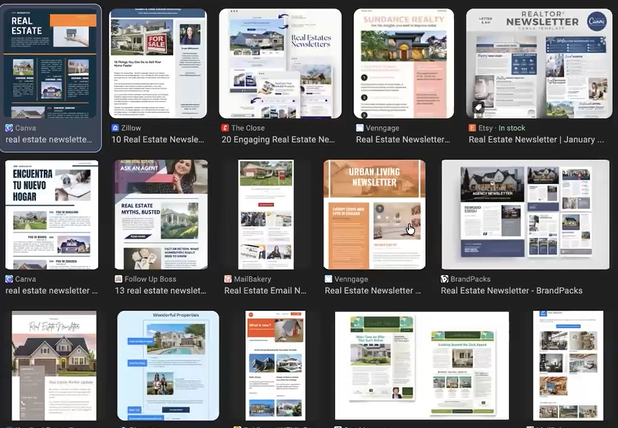
Many agent sends resemble big retail promos: lots of text, lots of images, and property blocks. That approach often misses the real goal of newsletter strategy.
The goal is not to show properties that recipients can see on the MLS or Zillow. The goal is to stay top of mind so the recipient thinks: this real estate professional understands local market conditions, taught me something, and this is worth forwarding to a friend.
When the content does not create that reaction, the next update is less likely to get opened, and it rarely earns replies because the recipient has nothing meaningful to respond to.
Reference for what recipients can already browse:
- Zillow: https://www.zillow.com/
What to include so the update feels worth opening
A simple way to make each newsletter feel relevant is to base topics on local demand signals, then turn the topic into a short update with interpretation-one clear trend, one takeaway, and one prompt to reply.
Topic sources mentioned in the workflow
- Google Keyword Planner for local volume and topic selection
https://ads.google.com/home/tools/keyword-planner/ - AnswerThePublic for question-style angles and topic expansion
https://answerthepublic.com/
Topic direction that fits the workflow
Instead of “homes for sale,” shape the content into a market update that demonstrates expertise and real estate news awareness.
Examples of high-utility angles (localize the city and neighborhoods):
- Housing market update
- Market reports and trends (mention market trends when they matter, and track real estate trends over time)
- Specialty angles like FHA or VA if that is the niche
- A simple mortgage rates note (especially when pricing shifts)
- Residential specifics (single-family, condo, etc.) and a quick commercial real estate mention if your audience asks about it
Pro-Tip: Remove any section that a reader could replace with a single Zillow search. Local interpretation is what keeps the newsletter memorable.
How it works: the video-first workflow step by step
This section follows the demonstrated process and keeps it repeatable.
Step 1: Pick a topic using demand signals
- Open Google Keyword Planner and enter a local phrase, such as “Sacramento real estate.”
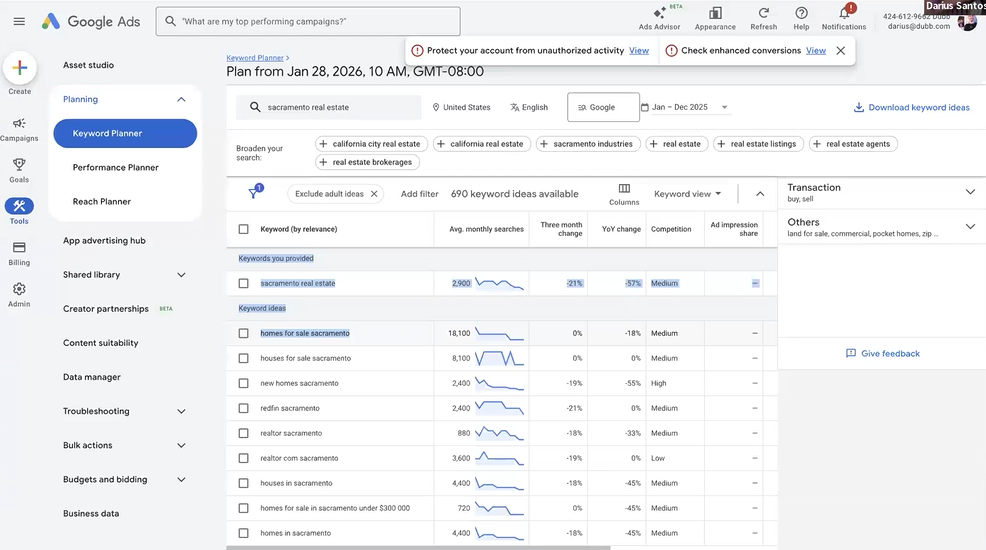
- Identify high-volume local terms.
- Use AnswerThePublic to expand into questions, such as "market trends."
- Select one topic you can cover in a short update.
Step 2: Find a market report to use as the source
Search for a market update report for your city. These often include charts, data, and analysis. The goal is not to memorize it. The goal is to use it as source material in a simple structure you can repeat.
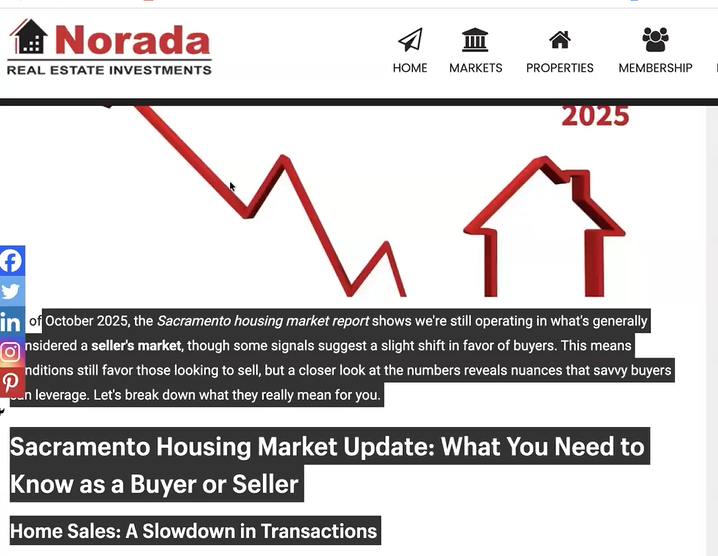
Step 3: Generate a script using AI
- Copy the market report text.
- In Dubb, go to Otto and paste the article (or use your favorite LLM).
- Ask for a script length that fits short-form video, such as about one minute.
- Save the script into your teleprompter scripts.
- Customize the script with one local example so it feels human.
Step 4: Record with teleprompter support
The demonstrated recording flow:
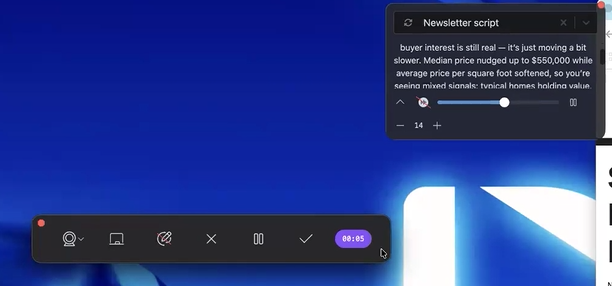
- Record in Landscape or Portrait Mode
- Scroll through the report while reading the script
- Place the teleprompter close to the camera to reduce “reading eyes”
Step 5: Send the video through your chosen email tool
Once the video is uploaded to a platform like Dubb, it can be shared and tracked through nearly any marketing tool, including Dubb, or your favorite CRM or email platform. The workflow in the video describes sending through Dubb directly using the built-in email campaign feature.
Alternative sending options
- Constant Contact: https://www.constantcontact.com/email-marketing
- Mailchimp: https://mailchimp.com/features/email-marketing/
- Your Preferred Real Estate CRM - Lofty, Followupboss etc
- Any Third Party Email Sender https://support.dubb.com/en/articles/5801501-how-to-optimize-dubb-video-for-3rd-party-services
Step 6: Set up sending inside Dubb
Dubb offers a feature that enables you to send your real estate newsletter as a bulk video email.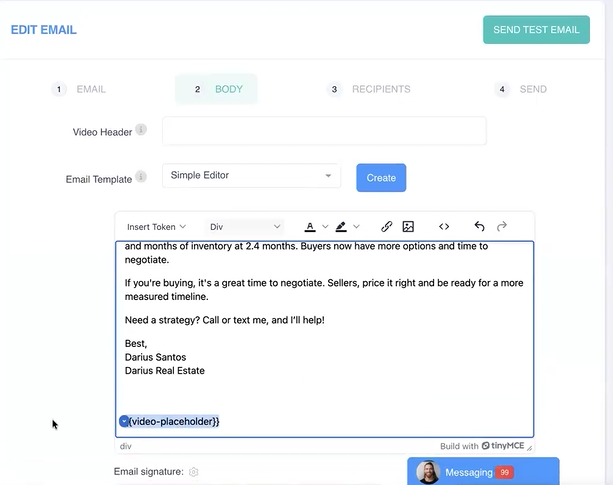
Refer to this support article for detailed instructions on how to send your newsletter using Dubb.
Examples and templates you can reuse
These examples are designed to match the demonstrated style: simple copy, one primary asset, one reason to respond.
Subject line ideas
- “1-minute market update for {{City}}”
- “Quick {{City}} housing snapshot (video)”
- “What changed this week in {{City}}?”
Short body template
Hi {{FirstName}},
Here’s a quick market update for {{City}}.
[VIDEO]
If you want the numbers for your neighborhood, reply with the area and I’ll send a quick breakdown.
One-minute market update outline
- What changed since last update (one headline)
- One data point that matters
- What it means for active buyers
- What it means for sellers
- One prompt to reply
Newsletter content ideas that fit the “top of mind” goal
- Neighborhood spotlight with one trend and one takeaway
- “What buyers misunderstand right now” (one point, one example)
- “What sellers can do this month” (one action)
- Myth vs reality (one myth, one correction)
Best practices to improve opens and replies
Put the value first
Move the video high in the message so it is seen immediately. Keep the copy short enough that the video is the obvious action.
Make the content forwardable
Forwarding happens when the update teaches something useful about the local market. Inventory lists rarely get forwarded because they are not unique.
Write for clarity, not length
Long sends tend to get ignored. Keep the body brief and focus on one local takeaway.
Leverage your sphere of influence by rotating topics that help people decide whether to buy or sell, rather than blasting listings.
Pro-Tip: A simple rule is to aim for a body length that can be read in under 10 seconds. If it takes longer, it usually becomes a skim and close.
Common mistakes and troubleshooting
Mistake: Turning the send into a property dump
What happens: Low replies and declining opens over time.
Fix: Replace listing blocks with one market insight and a short update video.
Mistake: Burying identity inside a sea of text
What happens: Readers forget who sent it.
Fix: Make face and voice the centerpiece so recognition compounds.
Mistake: Writing email bodies that are too long
What happens: Fewer plays and fewer replies.
Fix: Cut the body down to a few lines and lead with the video.
Mistake: Choosing topics without demand signals
What happens: Inconsistent topics and low relevance.
Fix: Use Keyword Planner and AnswerThePublic to guide topic selection.
Troubleshooting: The video feels like reading
Fix: Keep scripts short and position the teleprompter near the camera.
Tool landscape and when to use each
This workflow can be assembled with different tools. The main differences are whether the tool supports the script and recording workflow, and whether you can send and track results in the same place.
| Option | Best fit | What it supports in this workflow | Trade-offs |
|---|---|---|---|
| Dubb | Video-led market updates sent by email or SMS | Dubb Auto script generation from a report, teleprompter scripts, portrait recording workflow, optional Narrator approach, connect Gmail or Outlook, contact import into CRM, scheduling, tracking | Requires a consistent short-form recording cadence |
| Constant Contact | Traditional email sending and list management | Email campaigns and list tooling for standard sends | Script creation and recording happen outside the platform |
| Mailchimp | Marketing emails and automation | Campaign creation and delivery | Video workflow remains external and must be assembled with other tools |
| Keeping Current Matters | Service-led market content support | Market research and content ideas, with teleprompter and scripting support referenced for its elite tier in the workflow discussion | Ongoing subscription and less emphasis on building an internal repeatable workflow |
Proof: Why This Actually Works
Anonymized data across Dubb users shows a consistent pattern when teams switch from listing-heavy messages to short market update videos.
Who it includes: Multiple groups of local real estate agents and small broker teams sending recurring updates to their contact lists.
The problem: Their newsletters were packed with listings and long blocks of text, which gave recipients little beyond what they could already find on the MLS or Zillow. Engagement reflected that, with low reply volume and minimal forwarding.
What changed: They adopted a video-led update workflow using Dubb. Teams used a market report as the source material, generated a short script in Dubb Otto, recorded with a teleprompter, and sent a short email that placed the video at the top with a simple prompt to reply.
Outcome (directional, with numbers): Across this user set, sends that followed the video-led approach produced ~1.5x higher video click-to-play rates and ~30% higher direct reply volume compared to their prior listing-style sends over an 8-week period. The lift was strongest when the update emphasized “what changed” and “what it means,” because recipients had something specific to react to rather than a list of homes.
Methodology note: Based on anonymized Dubb sending and tracking signals from real estate users observed over an 8-week window, comparing relative performance between video-led market update sends and listing-style newsletter sends. Outcomes are reported as relative differences because lists, cadence, and market conditions vary.
Pro-Tip: Treat the email as the wrapper and the video as the content. When the copy is short and the update contains one clear local takeaway, the recipient has an obvious reason to watch and a concrete reason to reply.
FAQ
What should I put in a monthly newsletter?
A monthly client update works best when it includes one locally relevant insight, such as a quick market update, a neighborhood trend, or a simple myth vs reality explanation. The goal is to create a learned-something moment that makes the sender memorable, which in turn strengthens client relationships and drives referral behavior over time.
A short video update can help because it combines face, voice, and timely context, which is easier to remember than a long set of listings.
How often should I send a real estate newsletter?
Consistency matters more than frequency. Monthly or biweekly cadences are common because they are sustainable and predictable for recipients. When video is the centerpiece, keeping the update short makes it easier to maintain the schedule without turning emails into long reads.Do people still read real estate newsletters?
Yes, but recipients are more selective about what they open. Emails that resemble generic promos or inventory dumps are easier to ignore.
A short update with a clear takeaway is more likely to earn repeat opens, especially when the email gives one obvious action.
What is a good subject line for a market update newsletter?
A strong subject line is specific, local, and time-bound. Examples include “1-minute market update for {{City}}” or “Quick {{City}} housing snapshot (video).” The subject should signal insight, not a list of properties.Can a realtor use a template?
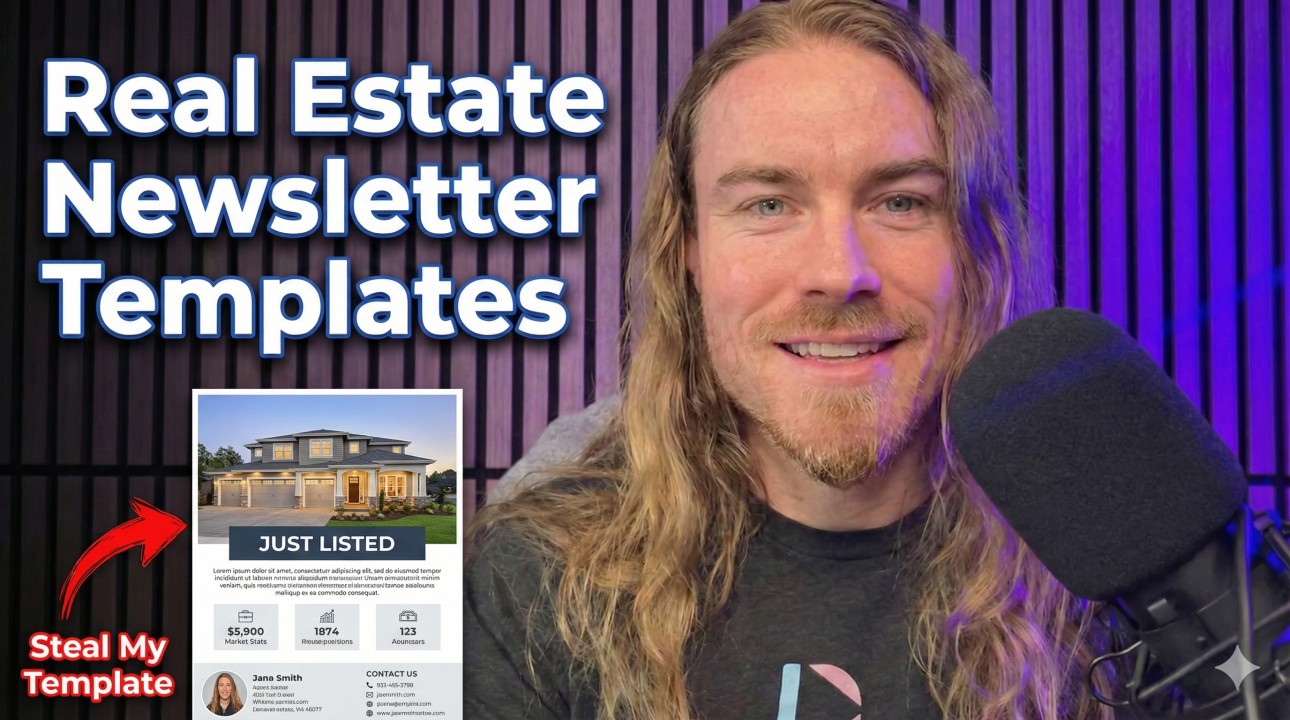
Yes-start with a customizable template, then add local data and one simple graphic. Include your contact information so a prospect can reply quickly.
Can I send a video newsletter from Gmail or Outlook or SMS?
Yes. In the workflow described, Gmail, Outlook, or an online/bulk SMS number can be connected in Dubb settings, then emails or SMS can be built and scheduled from there. Video can also be sent through an email platform like Constant Contact or Mailchimp, or almost any other email or sms tool, but the scripting and recording steps remain separate.How do I keep my newsletter out of spam?
Keep the message simple, avoid overly long bodies, and focus on one clear purpose. Authentication, list hygiene, and consistent sending practices also matter.
If video is included, placing it near the top and keeping supporting copy short helps reduce wall-of-text behavior that often leads to low engagement.
If your market changes fast, keep the update up-to-date and focus on one takeaway that reflects current market conditions for your audience’s business needs. This approach improves ease of use for you and consistency for them.
Note: If you want to expand into real estate newsletter marketing, treat it as a system-create content once, then reuse the same structure each month with small updates. Subscribe to your own send first so you can test the format before it goes out.
Streamlining your market update newsletter workflow with video
If you want to implement the workflow above without stitching together a bunch of separate steps, Dubb covers the core pieces in one place.
Here’s the “A, B, C” synthesis of what the post walked through and how it maps to what Dubb is doing in the transcript:
-
A: Decide what to send by starting with a real market report and turning it into a usable script using Dubb Auto, instead of guessing topics or trying to write from scratch each time.
-
B: Create the video fast using the teleprompter scripts workflow (and the optional Narrator approach mentioned) so the update is short, clear, and formatted for the platforms people already use.
-
C: Send and measure by connecting Gmail or Outlook, importing contacts into the built-in CRM, dropping the video into a simple email template, then scheduling the send and tracking results.
From an operator standpoint, the win is consistency. When the topic research, script creation, recording workflow, sending, and tracking are all part of one repeatable loop, it is easier to maintain a cadence that keeps you top of mind.
If you’re looking to implement the market update video newsletter workflow discussed here, you can set up a free trial at Dubb.com and run the first version using one market report and one short script.