


How to Send Trackable Video from ActiveCampaign Using Dubb
The Dubb ActiveCampaign integration is a fantastic way to capitalize on everything that both Dubb and ActiveCampaign have to offer. Whether you are a sales professional in your organization or are the CEO of a new startup, this integration offers a fantastic way for you to grow and scale your business.
In this post, we are going to discuss how Dubb integrates with ActiveCampaign. We will be sharing some granular tips and strategies so that you can get the most out of this priceless integration.
Let’s jump in.
About Active Campaign and Dubb
As you may already know, ActiveCampaign is the number one customer experience automation platform. In fact, according to the company, more than 150,000 businesses use ActiveCampaign to win customers’ hearts and minds.
ActiveCampaign users can do so many different things. From email marketing tools to CRM and sales automation tools, ActiveCampaign can help you get much closer to your business goals. This is true for the smallest businesses to the largest enterprise clients.
If you are coming across Dubb for the first time, you may be wondering what Dubb is and why this integration with ActiveCampaign is so valuable. Ultimately, Dubb is a leading video communication platform. Using Dubb, you can do so many different things. By becoming a Dubb user, you’ll find that you can do things like including many different calls to action (CTAs) below your video content, creating high-quality video content on the fly with the Dubb mobile app, creating stellar screen recordings using Dubb’s Chrome extension, and more.
Why Dubb and ActiveCampaign Are a Perfect Match
Simply put, Dubb and ActiveCampaign have tons of synergy. I think the three main qualities are differentiation, engagement, and conversions. Let’s talk about each of them here.
First, there is differentiation. Video lets you easily differentiate yourself from your competition.
Let’s face it: both you and your competitors are extremely busy. That said, all of us still need to communicate with and reach out to our prospects and customers. The default for many of us tends to be email or text-based communication. It seems like the default because we have been doing it for so long. However, just because you (and your competitors) may be substantially relying on text-based communication doesn’t mean that you have to. On the contrary, by opting for video, you can stand out in the eyes of your audience. Whether you are trying to persuade a warm prospect to become a paying customer or simply want to catch up with an important customer, video can separate you from your competitors.
Not only that, but your audience wants to consume video. This is where engagement comes into play. 68% of consumers prefer watching videos to learn about new products or services, as compared to other formats. There is already a built-in cohort of people that want to interact with your content in a visual format. By meeting them where their interests lie, you can both satisfy your audience and make a name for yourself in your sector or industry.
Finally, let’s talk about conversion rates. By conversion rates, I’m talking about clickthrough rates and open rates. At the end of the day, however, we are talking about sales. Sure, we can create any type of content that we want. But in the business context, we ultimately want to generate more sales.
Video drives lift throughout all of these components. The simple act of including video at multiple, and even all, stages of the process dramatically increases your chances of making a sale. You can see one example of this in an extremely illuminating study. That study showed that the simple inclusion of the word “video” in the subject line of email messages increases open rates by 19%. In other words, by simply including those five letters in your subject line, you already have a substantially better chance of having your audience members open your email messages, no matter what they discuss.
That’s not all. According to that study, using the word “video” in your subject line increased clickthrough rates by 65% and cut the number of unsubscribes by 26%. You get all of these benefits by one additional word in your subject line. Granted, the video and content inside your emails need to be valuable. If not, you are doing yourself a disservice and throwing away some of the initial interest from members of your audience. However, this study goes to show how video can help you increase your conversion rates and reach your sales goals. While there are numbers out there that show these positive effects to be even higher, you are ultimately putting yourself in a great position by recording and using video content in your external communications.
Video builds trust and understanding faster than any other type of content. By getting in the habit of creating high-quality video content and sharing it with your audience, you get all three benefits. Working together, they can both make your audience happier and get you much closer to your business goals.
How the Integration Works: Step-By-Step Instructions
Understanding the benefits of ActiveCampaign, Dubb, and video as a whole, let’s now discuss how Dubb’s ActiveCampaign integration actually works. What you need to do is connect the Dubb integration with your ActiveCampaign profile.
Luckily, this is very simple. It all starts in your ActiveCampaign account. You start by visiting your settings. Then, under the developer tab, you will find your URL and API keys. You will need both of these keys to proceed.
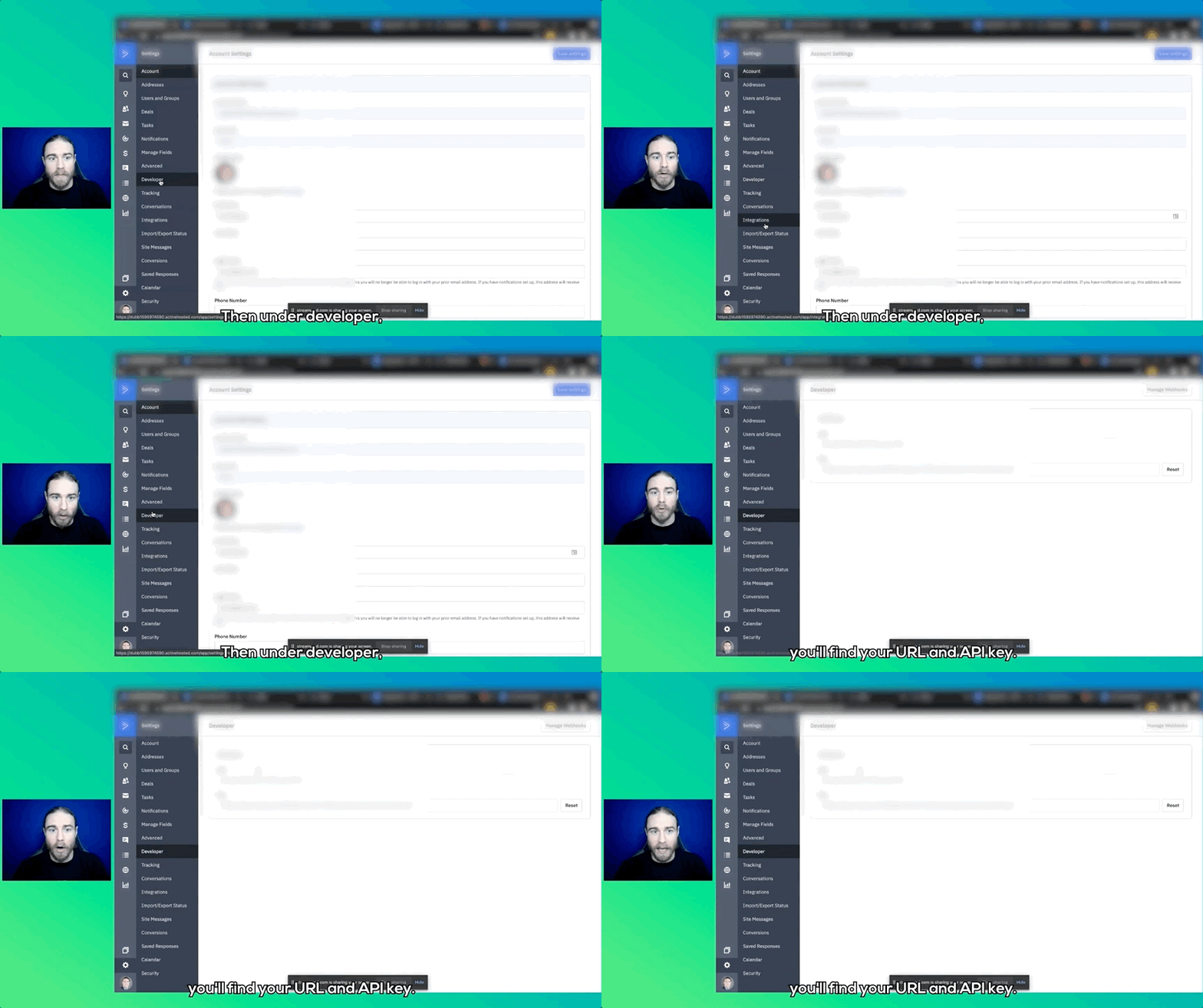
Now, you are going to want to go to your Dubb account. When you have it pulled up, you’ll then visit your settings. Then, under the team tab, click on the marketplace tab. There, you will find the ActiveCampaign integration with Dubb. Go ahead and click on the install button. Once you do that, you’re going to copy and paste those values (the URL and API keys) from your ActiveCampaign account into Dubb.
That is the first step to installing the integration. From there, the next step is synchronizing your contacts between both platforms. So you can take all of your contacts from ActiveCampaign, export them, and then import them into Dubb. Once you have synchronized contacts, you can keep them in sync automatically with services like Zapier.
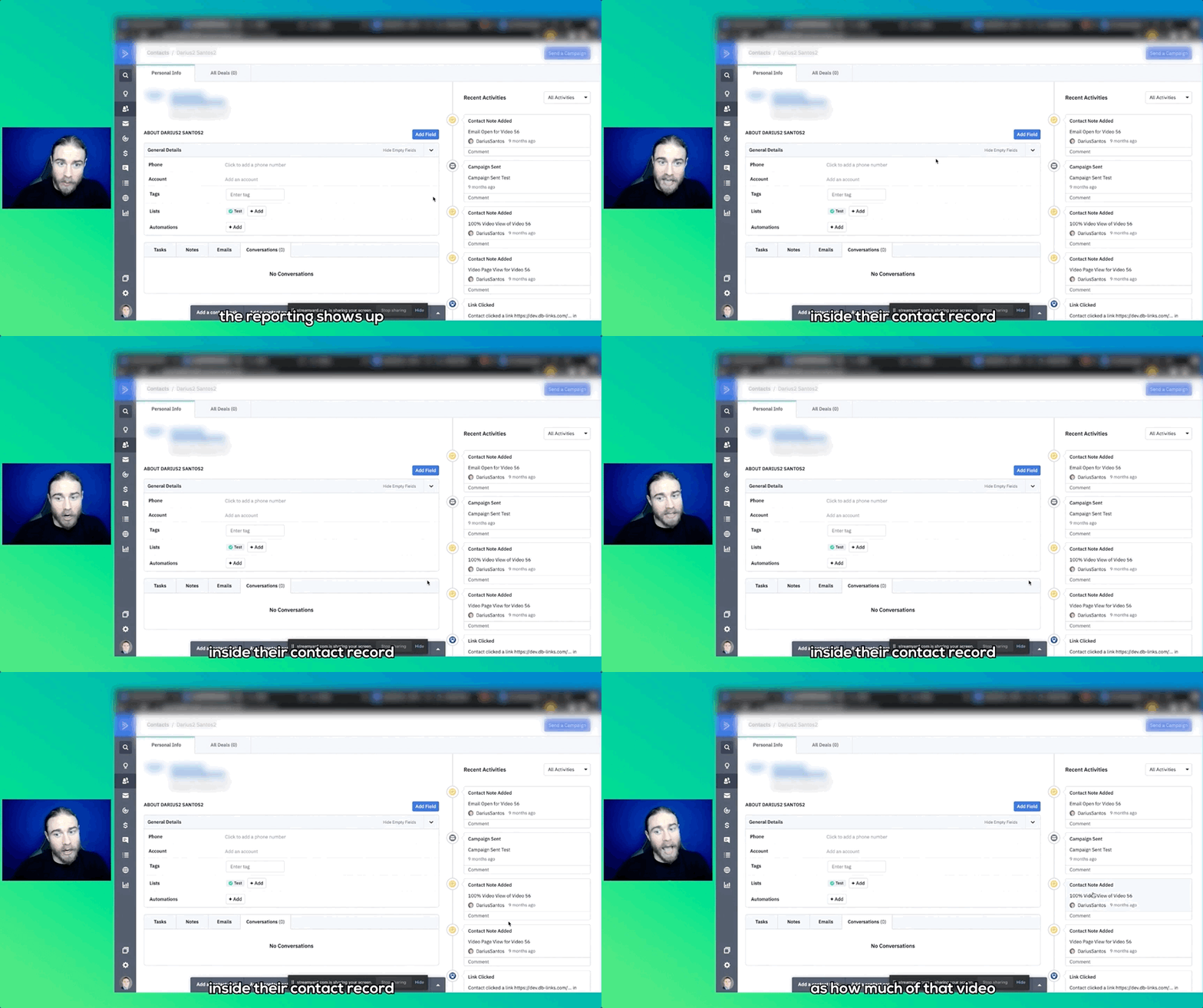
Now that your contacts are synchronized between Dubb and ActiveCampaign, you are ready to start sending and tracking your video content. You can do this all through your ActiveCampaign account. As you can see in the GIF below, once somebody has actually engaged with your video content, their activity appears inside their contact record. You can see things like how long they viewed the video and any other engagement that they performed with that video.
From there, you are ready to drop a video directly into your ActiveCampaign template. There are a few different ways to do this.
First, you can hyperlink the image or words inside your ActiveCampaign template with the link to your Dubb video. All you have to do is click “Share & Send,” optimize for ActiveCampaign, and then grab a copy of the URL by clicking on “Copy for Email.” From there, you can hyperlink that video into an image or text. The link is inside your template, making it extremely easy to send your video to any type of audience.
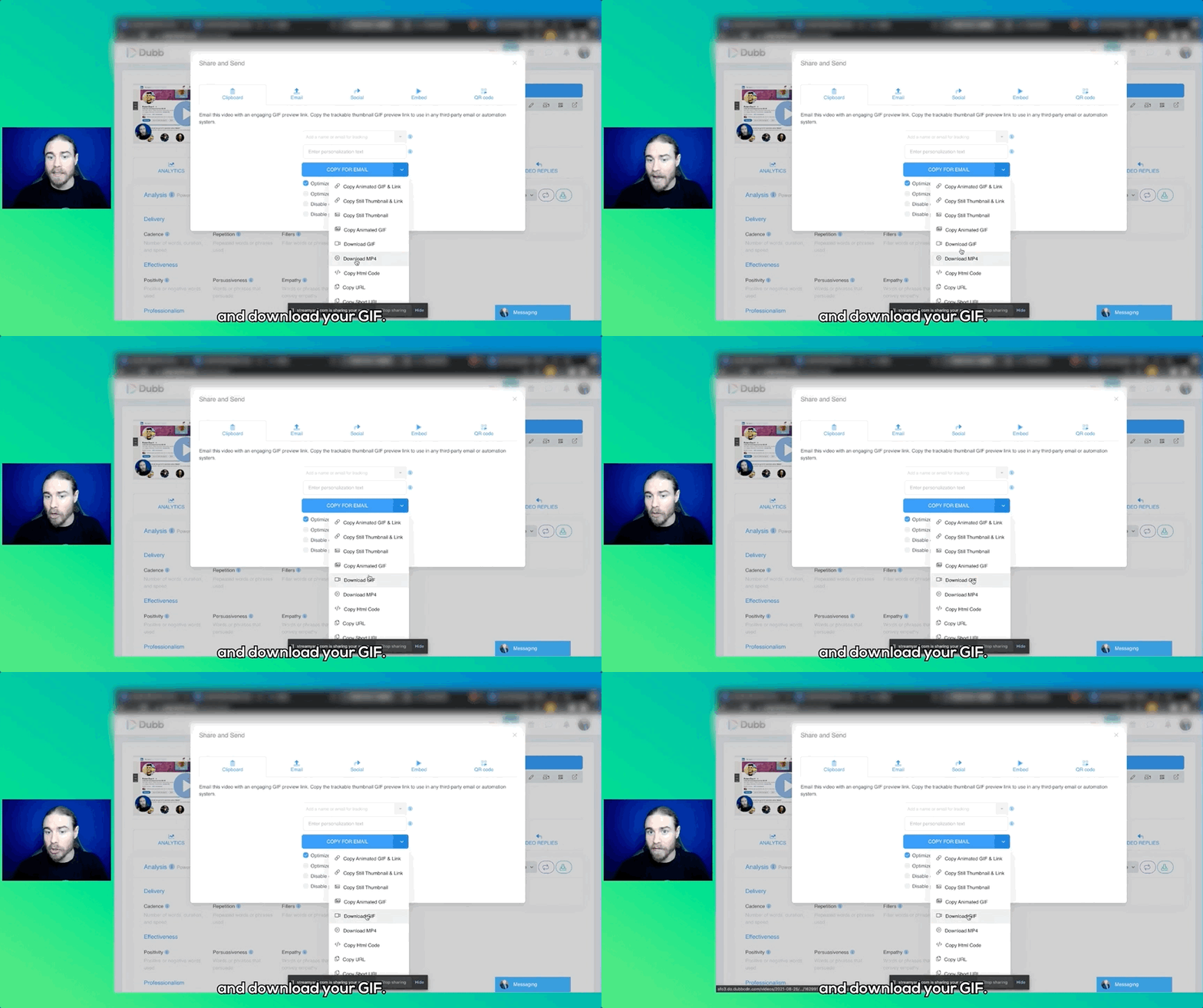
Separately, you can use a GIF inside of the actual email itself. Dubb automatically gives you a three-second animated GIF preview of any video that you have created. All you have to do is select the video that you want to be the basis for your GIF. Once you do that, you can click on the arrow next to the blue “Copy for Email” button. You will see an option for “Download GIF.” By selecting that option, you can see a three-second loop that is playing on your screen. From there, you can save the image, upload it to ActiveCampaign, and then hyperlink that image with the same URL that has been optimized for ActiveCampaign. Once again, to get that URL, you can go to “Share & Send” in Dubb, then click on “Copy For Email,” and then click “Copy URL.”
So once these steps are completed, you can provide personalized and trackable videos directly inside your ActiveCampaign email templates. Pretty cool, right?
What the tracking actually tells you
A tracked video link reports more than a view, and knowing which numbers matter saves a lot of dashboard time.
Three are worth watching. Whether the link was opened at all, which tells you if the email earned the click. How far the viewer got, which tells you whether the opening sentence matched the message that arrived. And whether they came back, which is the strongest signal in the whole dataset, because a second visit means the video answered something they needed to show someone else.
Ignore total views across the account. They mix a buyer watching a proposal with a colleague clicking a link from a newsletter, and the average of those two is a number that describes nothing.
Then wire the useful numbers into the next step. A contact who watched past the halfway point belongs in a different follow up than one who never opened. That single split is where most of the value of tracking actually sits.
Where video belongs in an automation
A video in an automated sequence works when it is doing a job that text cannot, and fails when it is decoration.
Three places make sense. The welcome message, because a face at the start of a relationship does something a paragraph cannot. The moment before a proposal is sent, because a short walkthrough of what is in the document reduces the questions that follow. And the reactivation message, where a personal, specific recording is the difference between a nudge and a nuisance.
Everywhere else, be careful. A video in a five email nurture sequence, identical for everyone, is a produced asset pretending to be personal, and viewers notice. The rule is that a recorded message should look like it was made for the recipient, because if it was not, the automation has replaced the relationship rather than supported it.
If the sending side is new to you, video email marketing for sales covers the format, how to send a video email walks through the mechanics of a video email, and building video email automations covers building the automation around it.
Keeping the link out of the spam folder
Adding video to an email changes the shape of the message, and the shape is what filters read.
Keep one image, not four. Put a real sentence above it, because a message that begins with a picture is the classic signature of a promotion. Keep the number of links low, and make sure the link points at your own domain rather than a shortener nobody recognises.
Test the message on a phone before the automation goes live. A preview image that is wider than the screen pushes the text below the fold, and a reader who cannot see a sentence in the first screen will not scroll to find one.
Then send the automated sequence to a small group first, and watch bounces and complaints for a week. An automation that misfires at scale is much harder to repair than one you tested on forty contacts.
Using the watch data in the next step
The point of a tracked link is not the report. It is the change in behaviour that the report makes possible.
Build two branches after a video is sent. In one, the contact watched most of it, and the follow up can reference the specific part they saw and ask a question about it. In the other, nothing was watched, and the follow up should test a completely different angle rather than repeat the same message louder.
That is a small amount of automation with a large effect, because it replaces a guess about interest with an observation. It also stops the most common failure of automated follow ups, which is sending a reminder about something the recipient never saw.
Review the branches quarterly. A branch that never produces a reply is a branch worth deleting, and a branch that produces most of the meetings is a place to put more of your time.
Going From Here
Now that you have sent your video through ActiveCampaign, you can use the powerful automations that the platform provides. Based on the engagement taken through your videos (whether your viewers have watched the video, clicked a button, or something else), you can sync the engagement straight back over to ActiveCampaign to trigger more automated workflows and recipes in your ActiveCampaign account.
An example is helpful here. Let’s say that you are trying to move a cold prospect down your sales funnel. You met this prospect at an in-person event and you want to help your prospect learn more about your product or service. What you can do is create and send them a video email. By doing that and including a call to action (CTA) button below the video, you can see how they are responding to your video message. Not only that, but the prospect’s actions related to your video can automatically start automated workflows that you created via ActiveCampaign. Putting all of this together, you can get valuable data on your prospects and present them with an engaging and personalized experience. Combining all of these elements, you have a much better chance of moving your audience members down your funnels and generating more sales.
Ultimately, video engagement is just the tip of the iceberg. It opens up all of the possibilities of using ActiveCampaign’s powerful automations. By using both of these tools together, you are armed with fantastic software that can help you reach your sales and marketing goals.
Frequently asked questions
Can I send video with ActiveCampaign?
Yes, using a Dubb link rather than an attachment. The email carries a preview and a tracked link, and the video plays on a page you control, which is also what keeps the message out of the spam folder.
Will a video link hurt deliverability?
Not on its own. Large attachments and image heavy layouts do. Keep one image, a real sentence, few links and your own domain, and the message arrives.
What should we track inside the sequence?
Whether the link was opened, how far the viewer got, and whether they returned. Split the next step on those three rather than on opens alone.
Should every automated email contain a video?
No. Use it where a face or a walkthrough does something text cannot: the welcome, the proposal, the reactivation. A personal format used impersonally does more harm than good.
Keep ActiveCampaign, add the video
Dubb gives you the preview and the tracked page, and the automation sends it for you.
Get Started Today
Whether you want to generate more sales or take some mission-critical work off of your plate, you can get the job done with this integration. Both Dubb and ActiveCampaign are focused on creating the best possible software for businesses of all shapes and sizes. By checking out this integration, you will be able to get more things done, provide a better experience for your prospects and customers, and help your business grow and scale.
If you are interested in using Dubb and ActiveCampaign, go ahead and click Start your free Dubb trial to get a free trial of Dubb’s premium plans. From there, you can go ahead and make the integrations within the Dubb marketplace. We look forward to helping you reach your sales and marketing goals!