How to Send and Track Videos Through Your Go High Level Integration
Sending trackable videos through Go High Level requires connecting a video platform to your GHL account, syncing contacts between the two systems, and embedding a video link or thumbnail directly inside your email or SMS templates. Once configured, every view and click is logged against the originating contact – without leaving the High Level environment.
Video has been shown to increase conversion rates by 30-300%, according to data cited across platforms including HubSpot and Campaign Monitor. Adding video tracking inside your existing GHL workflows means those conversion gains are captured and attributable, not invisible.
What Is a Go High Level Integration?
A Go High Level integration is a third-party connection that extends the native capabilities of the GHL CRM and marketing automation platform. Integrations plug into GHL’s contact management, pipeline stages, workflow triggers, and messaging tools – allowing external platforms to read, write, and react to data inside GHL sub-accounts.
The Dubb Go High Level integration specifically connects Dubb’s video hosting and tracking platform to GHL’s contact database and messaging system. When a contact receives a video sent through this integration, their viewing behavior – watch time, clicks, replays – is tracked and tied back to their GHL record. This gives sales and marketing operators visibility into video engagement without rebuilding their existing GHL automations from scratch.
Table of Contents
- What Is a Go High Level Integration?
- Prerequisites: Syncing Contacts Between GHL and Dubb
- How to Install the Dubb Integration in Go High Level
- How to Add a Trackable Video to a GHL Email Template
- How to Add a Trackable Video to a GHL SMS Template
- Tracking Video Performance Inside Go High Level
- GHL Video Integration: Comparison Table
- Best Practices and Common Mistakes
- Proof: Why This Actually Works
- FAQ
- Streamlining Your Go High Level Integration Workflow with Video
Prerequisites: Syncing Contacts Between GHL and Dubb
Before any video can be sent or tracked, contacts need to exist in both platforms. The sync works as follows:
- Export contacts from GHL as a CSV file. This is a one-time manual step.
- Import that CSV into Dubb. This seeds Dubb’s contact database with your existing GHL records.
- Set up the ongoing sync via the integration (covered in the next section). After the initial import, new contacts created in GHL are automatically mirrored to Dubb – no repeat CSV exports required.
Dubb provides a service for customers to clean, verify, and import your contacts on your behalf, if you need support with this.
How to Install the Dubb Integration in Go High Level
Setting up the connection between Dubb and GHL takes only a few steps inside the Dubb dashboard:
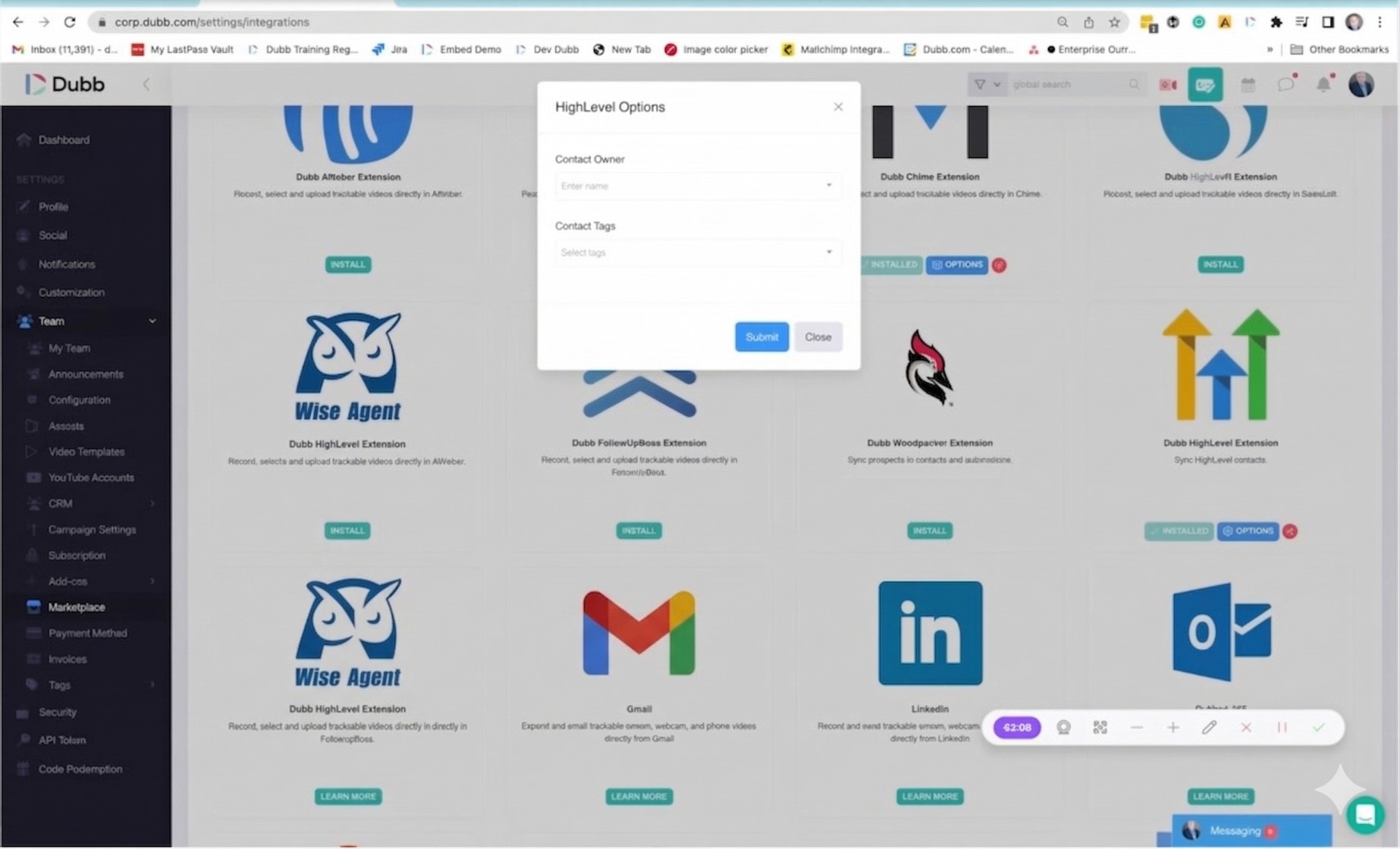
- Navigate to the Team section inside your Dubb account.
- Click on Marketplace.
- Search for High Level and click Install.
- Authenticate your High Level account when prompted.
- After authentication, configure how you want contacts to be assigned – including which team member receives them and which tags get added to each contact as it syncs over to Dubb.
That’s the complete installation. From this point forward, contacts are kept in sync automatically across both systems.
A practical rule of thumb: Set your GHL tags to reflect lead source or funnel stage at the point of sync. This makes it far easier to build smart lists in Dubb later based on where a contact originated in your pipeline – and to fire the right video sequence at the right stage.
How to Add a Trackable Video to a GHL Email Template
Once the integration is live, embedding a trackable video in a GHL email template works the same way whether you’re editing a workflow sequence or a one-off broadcast.
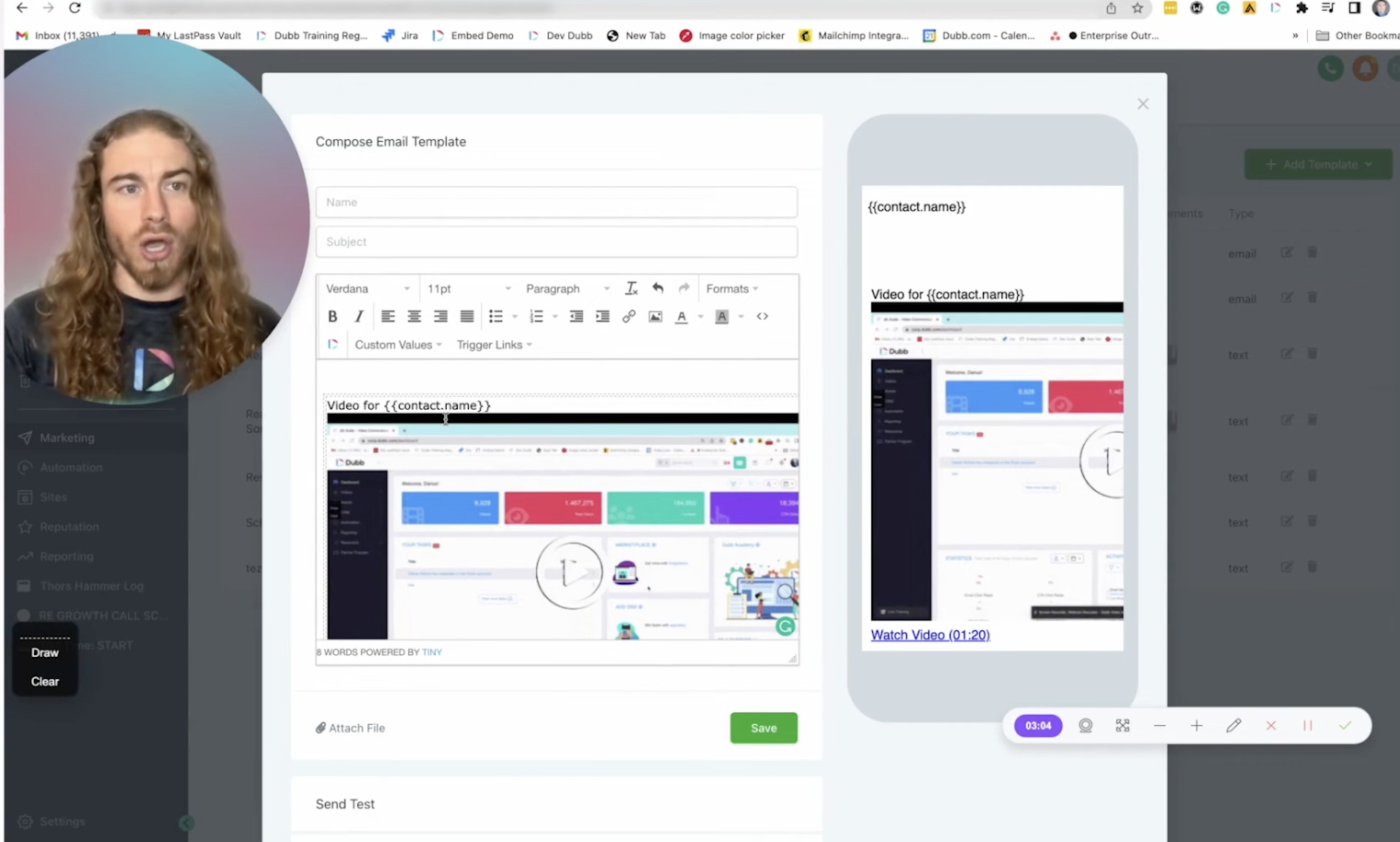
- Open the GHL email editor and position your cursor where you want the video to appear.
- Click the Dubb button inside the editor toolbar.
- Your Dubb video library opens. Search for the video you want to share and click the Share button.
- Dubb automatically detects that you’re working inside the GHL system.
- Add personalization text above the video thumbnail using GHL’s custom values. For example: use
contact.full_nameto display “Video for [First Name]” above the thumbnail. - Copy the embed code and paste it into the body of your template.
The video is now embedded with a personalized thumbnail and full tracking enabled. Every recipient who opens the email and engages with the video will have that activity logged in Dubb and visible in GHL’s bulk activity reports and automation triggers.
How to Add a Trackable Video to a GHL SMS Template
SMS delivery requires a slightly different approach because text messages cannot render HTML thumbnails the way email can.
- Open the GHL SMS editor.
- Click the Dubb button.
- In the share options, click the dropdown (rather than the default “Copy for Email” option).
- Select Copy Short URL.
- Paste that short URL directly into the body of your SMS template.
The short URL functions as a trackable link. When a contact taps it, Dubb records the view, the watch time, and the click – all tied back to that contact’s activity feed in GHL. This means your workflow triggers can fire based on actual video engagement, not just message delivery.
A simple rule for SMS workflows: Always use the short URL format for text message templates. Using the full embed code in an SMS will break the message and prevent tracking. The short URL is the only format that works reliably across all carriers and devices.
Tracking Video Performance Inside Go High Level
After videos are sent through either channel, performance data surfaces in two places:
- Dubb’s activity dashboard – shows per-contact watch time, replay count, and click-through behavior.
- GHL’s automation and bulk activity logs – video views and engagement events from Dubb appear here, allowing you to set up workflow triggers based on video behavior.
This means it’s possible to automatically move an opportunity to the next pipeline stage when a contact finishes a video, or filter contacts into smart lists based on whether they watched a demo, clicked a CTA, or dropped off early. Those segment signals can then power downstream nurture sequences without manual intervention.
GHL Video Integration: Comparison Table
| Platform | GHL Native Integration | Contact Sync | In-Editor Video Embed | Per-Contact View Tracking | SMS Tracking | Best For |
|---|---|---|---|---|---|---|
| Dubb | Yes (Marketplace) | Automatic after initial CSV | Yes (Dubb button in GHL editor) | Yes | Yes (short URL) | Sales teams needing per-contact video tracking inside GHL workflows |
| Loom | No native integration | Manual | Paste embed/link manually | Limited (aggregate only) | Link only (untracked) | Internal team communication; quick async updates |
| BombBomb | Limited (via Zapier) | Via Zapier workflow | Via Zapier or manual | Yes | Partial | Real estate agents; relationship-based outreach |
| Vidyard | No native GHL integration | Manual/API | Manual embed | Yes (enterprise tier) | No | Enterprise B2B sales with existing Salesforce/HubSpot stack |
Best Practices and Common Mistakes
Do this:
- Complete the one-time CSV import before installing the integration. If you skip it, contacts created before the integration date will not have a Dubb record and cannot be tracked retroactively. If you need support, reach out to Dubbs team and they will help clean, verify, and import your contacts.
- Use GHL custom values (like
contact.full_name) to personalize the video thumbnail text. Personalized thumbnails increase open-to-click rates. - When deploying this across client sub-accounts, include the Dubb integration setup in your agency snapshots so it carries over automatically to new clients.
- Use short URL format exclusively in SMS templates – never paste the email embed code into a text message.
Avoid this:
- Don’t use the email embed format in SMS templates. It will render as broken code in the recipient’s message thread.
- Don’t skip tag assignment during the integration setup. Tags applied at the sync stage make it possible to build smart lists and fire targeted video sequences by segment.
- Don’t assume the integration fires retroactively. It only tracks video activity on contacts that exist in Dubb at the time of send.
Proof: Why This Actually Works
Based on anonymized usage patterns across sales teams using Dubb’s Go High Level integration, observed over ongoing platform activity:
Teams that set up per-contact video tracking inside GHL workflows – rather than sending plain video links – report a meaningful difference in follow-up efficiency. The specific behavior pattern observed repeatedly: when a rep can see that a prospect watched 80%+ of a video before going quiet, they adjust their follow-up message to reference the video content directly rather than re-explaining it. That one change – context-aware follow-up – tends to produce more replies than generic re-engagement sequences.
In one representative scenario, a mid-market B2B agency managing GHL sub-accounts for multiple clients added Dubb video tracking to their existing follow-up workflows. Before the change, their follow-up triggers were time-based (Day 1, Day 3, Day 7). After adding video engagement data, they rebuilt those triggers to fire based on watch percentage. Contacts who watched under 30% received a shorter re-engagement video. Contacts who watched over 70% moved to a direct booking sequence. The result was a material reduction in wasted follow-up touches and a cleaner pipeline.
The underlying mechanic is simple: GHL’s trigger system is powerful, but it needs behavioral signals to act on. Video watch data is one of the richest intent signals available at the top of funnel – and the integration makes that data available inside the same system where the follow-up already lives.
FAQ
How do I connect Dubb to Go High Level?
Go to the Team section in your Dubb account, click Marketplace, find High Level, and click Install. You’ll be prompted to authenticate your GHL account. After that, the integration is active and contacts sync automatically. A one-time CSV import from GHL into Dubb is recommended before setup to ensure existing contacts are trackable.
Does the Dubb Go High Level integration work for both email and SMS?
Yes. For email, you embed the video thumbnail directly into the GHL email editor using the Dubb button. For SMS, you use the short URL format instead – copy the short URL from the Dubb share dropdown and paste it into your SMS template body.
Can I track who watched my video when sent through a GHL workflow?
Yes. Once the integration is configured, video views, watch time, and click activity are logged per contact. This data is visible in both Dubb’s activity dashboard and in GHL’s bulk activity and automation logs, allowing you to set up triggers based on individual video engagement.
How do I add video personalization inside a GHL email template?
After clicking the Dubb button and selecting your video, use GHL’s custom values (such as contact.full_name) to add personalized text above the video thumbnail. For example, entering “Video for [contact.full_name]” displays the recipient’s name directly on the thumbnail when the email is sent.
Can this integration be included in GHL agency snapshots for client deployments?
Yes. The Dubb integration configuration can be incorporated into your agency snapshots so it transfers consistently when spinning up new client sub-accounts. This avoids manually reinstalling the integration for each new client.
What happens to contacts created in GHL after the integration is set up?
After the integration is installed, contacts created in GHL are automatically synced to Dubb on an ongoing basis – no further CSV exports are needed. The initial one-time CSV import covers contacts that existed in GHL before the integration was installed.
Is there a free trial available for the Dubb Go High Level integration?
Yes. Dubb offers a free trial at dubb.com. The GHL integration is available to explore during the trial period.
Streamlining Your Go High Level Integration Workflow with Video
The three pieces covered here – contact sync, email video embedding, and SMS short URL tracking – form a complete loop. Contacts enter Dubb from GHL, videos go out through existing GHL templates, and engagement data flows back in to power smarter triggers and pipeline movement.
The setup is genuinely lightweight. One Marketplace install, one CSV import, and a button inside the GHL editor is all it takes to start sending and tracking videos at scale – across sub-accounts, across channels, and without rebuilding existing automations.
If you want to see these workflows in action, start a free trial at dubb.com. The GHL integration is available immediately after signup.